Turn on suggestions
Auto-suggest helps you quickly narrow down your search results by suggesting possible matches as you type.
- Pandora Community
- :
- Support
- :
- Desktop
- :
- Re: Desktop App + Web: Error "We're having trouble...
Options
- Subscribe to RSS Feed
- Mark Post as New
- Mark Post as Read
- Float this Post for Current User
- Bookmark
- Subscribe
- Mute
- Printer Friendly Page

07-14-2025
06:56 AM
- Mark as New
- Bookmark
- Subscribe
- Mute
- Subscribe to RSS Feed
- Permalink
- Report Inappropriate Content
Recently (around July 10th) Pandora music started shutting down unexpectedly and displaying the message that read "We'er having trouble playing audio on this device." This was after years of uninterrupted and satisfactory service.
Trying various troubleshooting suggestions provided by Pandora Support has not fixed the issue.
Has anyone else experienced this problem?
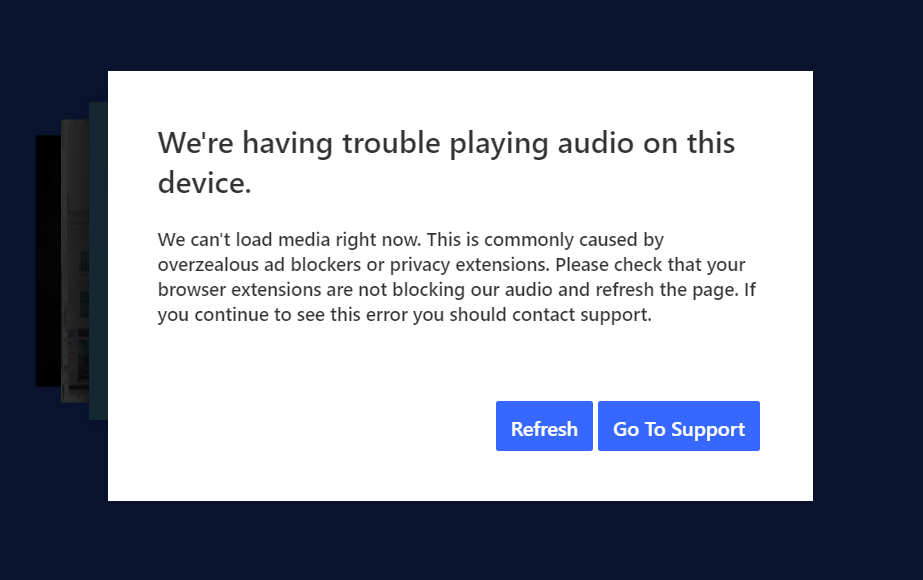
mod edit: updated title for clarity
141 Replies

- Mark as New
- Bookmark
- Subscribe
- Mute
- Subscribe to RSS Feed
- Permalink
- Report Inappropriate Content
@cjbricks, I know how you feel. I have had similar issues in the past, as well as other Pandora users. The following steps have helped me and others, so possibly they will for you.
Here's a consolidated list of steps that have helped others resolve or reduce the issue:
🛠️ Fixes You Can Try
1. Clear Cache and Cookies
In Chrome or Edge: Go to Settings → Privacy → Clear browsing data.
Clear cached images/files and cookies, then restart the browser.
2. Disable Hardware Acceleration
In Chrome: Settings → System → Turn off “Use hardware acceleration when available.”
This has helped some users with audio playback issues.
3. Try Incognito or Private Mode
Open Pandora in an incognito/private window. This bypasses extensions and cached data that might interfere.
4. Check Audio Drivers
Make sure your sound drivers are up to date.
You can do this via Device Manager → Sound, video and game controllers → Right-click your audio device → Update driver.
5. Switch Browsers Temporarily
Some users report better stability in Firefox or Opera when Pandora glitches in Chrome or Edge.
6. Use Pandora Desktop App
If you're using the web version, try downloading the Pandora Desktop App; it sometimes handles playback better.
7. Disable Extensions
Ad blockers, privacy extensions, or audio-related plugins can interfere. Try disabling them or whitelisting Pandora.
8. Check Network Stability
Even if your internet seems fine, Pandora is sensitive to brief drops. Try a wired connection or restart your router.
🧠 What Might Be Going On
Recent Pandora Updates: Many users started seeing this issue around July 2025 after a backend update.
Browser Compatibility: Pandora may be tweaking how it handles audio in different browsers.
Session Timeouts: If the station plays for a while and then stops, it could be a session or token expiration issue.
If none of these work, I recommend reaching out directly to Pandora Support and referencing the error message and your setup. You’re not alone in this — their community forums are full of similar reports.
Wish you the best. Take care and GOD bless.
MOHLovesAlaska

- Mark as New
- Bookmark
- Subscribe
- Mute
- Subscribe to RSS Feed
- Permalink
- Report Inappropriate Content
this is not a solution
- Mark as New
- Bookmark
- Subscribe
- Mute
- Subscribe to RSS Feed
- Permalink
- Report Inappropriate Content
I am having the same problem. I use malwarebytes but have given it Pandora.com to not block. I do not have this problem (yet) on another computer. This is really annoying and is getting to the point that I am considering canceling my pandora account. I have premium to not have to deal with ads.

- Mark as New
- Bookmark
- Subscribe
- Mute
- Subscribe to RSS Feed
- Permalink
- Report Inappropriate Content
Not a solution, not resolved
October 27th, 2025
I'm getting this issue. Solution is ongoing, not resolved. How in the heck does it matter what we're listening to? I'm listening to you!! You're not playing. It happens after every song for me. I refresh the page, plays one song, error. refresh the page, plays one song, error.
Doesn't sound like there's any solutions coming any time soon, so this is more of a post to keep the post active.
Moderator's edit: Merged posts.
- Mark as New
- Bookmark
- Subscribe
- Mute
- Subscribe to RSS Feed
- Permalink
- Report Inappropriate Content
I unsubscribed today as well. Pandora has been pretty useless while working because of this issue.

- Mark as New
- Bookmark
- Subscribe
- Mute
- Subscribe to RSS Feed
- Permalink
- Report Inappropriate Content
refresh the browser, select 'now playing', refresh the browser, select 'my collection'
should be good for several songs, when it stops, repeat the above instructions.
- Mark as New
- Bookmark
- Subscribe
- Mute
- Subscribe to RSS Feed
- Permalink
- Report Inappropriate Content
I get the same problem and despite numerous complaints to Pandora support, they have been reluctant to fix it or spend much time troubleshooting it. I tried different browsers with the same experience. It is not browser extensions or overzealous ad blockers, as I manage the IT for my company, and it happens both at work and at home. I will be dropping Pandora the end of this year. I have been using **** (a competing music streaming service) for weeks without issue (and it is less expensive than Pandora). While I like the music from Pandora better, it isn't worth the frustrations and lack of action by the Pandora team.
Moderator's edit: Removed external sources mention.

- Mark as New
- Bookmark
- Subscribe
- Mute
- Subscribe to RSS Feed
- Permalink
- Report Inappropriate Content
This has been happening to me for months. I've tried switching browsers (Edge, Safari and Brave) but still had the issue on all of them. I found this community post yesterday and will now start documenting them in order to help others find the solution.
- I was listening to a personal station I created many years ago - Classical V - with a paid subscription
- If it matters what song it happened after, The Piano Guys "Ordinary" had just finished playing
- I listen to Pandora using the website "pandora.com" while at work
- Today I was running Pandora in Brave (1.83.120), with shields down, in a regular tab
- Playback did resume when I clicked on the browser's Refresh button
- I use a Macbook Pro, 14", Nov 2024, Apple M4 Chip, 32G Memory, running Sequoia 15.6.1
- Mark as New
- Bookmark
- Subscribe
- Mute
- Subscribe to RSS Feed
- Permalink
- Report Inappropriate Content
Here's my incidents on 10/31/25 -
- I listen to a personal station I created many years ago - Classical V - with a paid subscription
- I use the website "pandora.com" while at work
- Today I was running Pandora in Brave (1.84.132), with shields down, in a regular tab
- I use a Macbook Pro, 14", Nov 2024, Apple M4 Chip, 32G Memory, running Sequoia 15.6.1
First time:
- The song playing before it stopped was Jennifer Thomas "Glorious"
- Playback did resume when I clicked on the error message's Refresh button
Second time:
- The song playing before it stopped was Cincinnati Pops "Big Country"
- Playback did resume when I clicked on the error message's Refresh button
Third time today:
- I can't give you what song it happened after because Pandora won't restart this time
- Playback did NOT resume when I clicked on the error's Refresh button - it failed 3 times in a row so I quit for the day
Moderator's edit: Merged comments.
- Mark as New
- Bookmark
- Subscribe
- Mute
- Subscribe to RSS Feed
- Permalink
- Report Inappropriate Content
Same issue. Running Windows 11 on a new HP desktop. Worked for years on my previous PC. I even tries adding the Pandora Forever extension to my Google Chrome platform. No success. Considering canceling my Pandora and just using my **** account.

- Mark as New
- Bookmark
- Subscribe
- Mute
- Subscribe to RSS Feed
- Permalink
- Report Inappropriate Content
Your work is appreciated. An easier approach is to write off Pandora and use another service. I've been a paid Pandora member for 15+ years, but they have no customer service. I also can't log on from my Roku stick. It just doesn't accept my credentials. I actually exchanged emails with service and they had no idea and no solutions.
- Mark as New
- Bookmark
- Subscribe
- Mute
- Subscribe to RSS Feed
- Permalink
- Report Inappropriate Content
Having the same issue. Windows 11 on a PC, in Chrome, no extensions running. It happens constantly throughout the day. Every radio station, random songs. It won't play more than an hour or two, and often stops after a couple of songs. I'm ready to find another music service at this point.

- Mark as New
- Bookmark
- Subscribe
- Mute
- Subscribe to RSS Feed
- Permalink
- Report Inappropriate Content
Same issue. Started about 2-3 weeks ago. Tried 3 different browsers. Windows 11
How is this a solution?
- Mark as New
- Bookmark
- Subscribe
- Mute
- Subscribe to RSS Feed
- Permalink
- Report Inappropriate Content
Here's my incidents on 11/4/25 -
- I listen to a personal station created years ago - Classical V - with a paid subscription
- I use the website "pandora.com" while at work
- Today I was running Pandora in Brave (1.84.132), with shields down, in a regular tab
- I use a Macbook Pro, 14", Nov 2024, Apple M4 Chip, 32G Memory, running Sequoia 15.6.1
Second incident today (first happened while I had stepped away from my desk but it did restart 😞
- The song that had just finished was John Powell "Raiders Return to Busy, Busy Berk"
- Playback did NOT resume with the first Refresh but it did after the second Refresh
Third incident today:
- The song that had just finished was Arthur Rubinstein "Grande valse brillante in E-Flat Major, Op. 18"
- Playback did resume when I clicked on the error's Refresh button
Fourth incident happened after the very next song. After hitting Refresh 4 times plus using the browser's refresh option, I only received the error - the music would not start replaying.
I switched to a different browser, Safari (Version 18.6 (20621.3.11.11.3)), and I tried a Private Tab. After the tab locked on me 3 or 4 times during playback, requiring a password to unlock (which I've never experienced before), I finally gave up for the day. It is truly frustrating not being able to listen to Pandora right now without these issues. 😞
Moderator's edit: Merged comments.

- Mark as New
- Bookmark
- Subscribe
- Mute
- Subscribe to RSS Feed
- Permalink
- Report Inappropriate Content
Started having this issue when I played a new station, it was working just fine before then. played a new station, then selected deep cuts
- Mark as New
- Bookmark
- Subscribe
- Mute
- Subscribe to RSS Feed
- Permalink
- Report Inappropriate Content
Here's my incidents on 11/5/25 -
- I listen to a personal station created years ago - Classical V - with a paid subscription
- I use the website "pandora.com" while at work
- Today I was running Pandora in Brave (1.84.132), with shields down, in a regular tab
- I use a Macbook Pro, 14", Nov 2024, Apple M4 Chip, 32G Memory, running Sequoia 15.6.1
Second incident today (first happened while I was away from my desk but it did restart):
- The song that had just finished was George Szell & The Cleveland Orchestra "Symphony No. 6 in F Major, Op. 68 "Pastoral": I. Erwachen heiterer Empfindungen bei der Ankunft auf dem Lande. Allegro ma non troppo"
- Playback did resume when I clicked on error's Refresh button
Third incident today:
- The song that had just finished was Marilyn Byrnes "Colors of the Wind"
- Playback did resume when I clicked on the error's Refresh button
Fourth incident today:
- I could not look up what song was playing before it happened because the Refresh did not work
- Playback did not resume, after clicking on the error's Refresh button five (5) times
- Mark as New
- Bookmark
- Subscribe
- Mute
- Subscribe to RSS Feed
- Permalink
- Report Inappropriate Content
November 2025. Still have this issue constantly. Both web and windows app, never on android. It is impossible to "work while Pandora" like I have for years. The player stops after every song. Sometimes a dozen refreshes required.
What is going on? How can this be such a mystery?
PLEASE fix.

- Mark as New
- Bookmark
- Subscribe
- Mute
- Subscribe to RSS Feed
- Permalink
- Report Inappropriate Content
Same. I've had Pandora for years and years and this is definitely going to impact renewing my subscription. I have experienced this problem at home, at work, via Google, tried all of the steps to address it, and nothing has corrected the issue. I literally cannot listen to Pandora at all. The pop up error message is constant. It's a shame Pandora has had knowledge of this issue for so long, and has yet to provide a remedy to fix it.
- Mark as New
- Bookmark
- Subscribe
- Mute
- Subscribe to RSS Feed
- Permalink
- Report Inappropriate Content
Incidents on 11/6/25 -
- I listen to a personal station created years ago - Classical V - with a paid subscription
- I use the website "pandora.com" while at work
- Today I was running Pandora in Brave (1.84.132), with shields down, in a regular tab
- I use a Macbook Pro, 14", Nov 2024, Apple M4 Chip, 32G Memory, running Sequoia 15.6.1
First incident today:
- The song just before it stopped was Jean-Yves Thibaudet "Marianelli: Arrival To Netherfield (From "Pride & Prejudice" Soundtrack)"
- Playback did resume when I clicked on error's Refresh button
Second incident today (11:18am):
- The song before it stopped was John Williams & London Symphony Orchestra "Flying Theme (From "E.T. the Extra-Terrestrial")"
- Playback did resume when I clicked on error's Refresh button
Third incident today (11:45a):
- The song before it stopped was BBC Philharmonic Orchestra "Pictures at an Exhibition (Arr. Leopold Stokowski): I. Promenade"
- Playback did resume when I clicked on error's Refresh button
Fourth incident today (12:08p):
- The song before it stopped was Jean-Yves Thibaudet "Marianelli: Your Hands Are Cold (From "Pride & Prejudice" Soundtrack)"
- Playback did resume when I clicked on the error's Refresh button
Fifth incident today (12:29p):
- The song before it stopped was The City Of Prague Philharmonic Orchestra "Eternal Father, Strong to Save (From "Crimson Tide")"
- Playback did resume when I clicked on the error's Refresh button
Sixth incident today (12:45p approx):
- The song before it stopped was Tamás Vásáry "Deux Arabesques: Debussy: 2 Arabesques, CD 74: No. 1, Andante con moto"
- Playback did resume when I clicked on the error's Refresh button
Seventh incident (1:23p):
- The song before it stopped was Michele McLaughlin "Into the Sunset"
- Playback did resume when I clicked on the error's Refresh button
- Mark as New
- Bookmark
- Subscribe
- Mute
- Subscribe to RSS Feed
- Permalink
- Report Inappropriate Content
I have been a Pandora Plus member for 20+ years. More than that, I've been a Pandora evangelist. Whenever someone rambles on about Spotify, I tell them how Pandora is amazing for discovering music I've never heard before. Nothing beats it.
But now? How can I keep giving them subscription fees when it's no longer a usable product? I listen for HOURS each day, but now it's non-stop frustration with refresh refresh refresh refresh refresh refresh refresh.
Does ANYONE at Pandora care?
