- Mark as New
- Bookmark
- Subscribe
- Mute
- Subscribe to RSS Feed
- Permalink
- Report Inappropriate Content
This didn't work for me. I had to switch from access through Google in order to get a family plan and I have lost all of my playlists and everything else except my Stations. Before I made the change I was told that I would lose nothing. Pandora lied to me. I want my Playlists back.
Moderator Edit: Edited title for clarity
- Mark as New
- Bookmark
- Subscribe
- Mute
- Subscribe to RSS Feed
- Permalink
- Report Inappropriate Content
@spreng Hey I'm sorry that happened to you. I didn't experience that when I switched from being billed by Google to direct pay through Pandora to upgrade to the Family Premium plan. I'll tag @AdamPandora 1 of the moderators. I'm sure Pandora can fix this for you.


- Mark as New
- Bookmark
- Subscribe
- Mute
- Subscribe to RSS Feed
- Permalink
- Report Inappropriate Content
@spreng I took a look on my end, and can see all of your playlists are still in your collection:
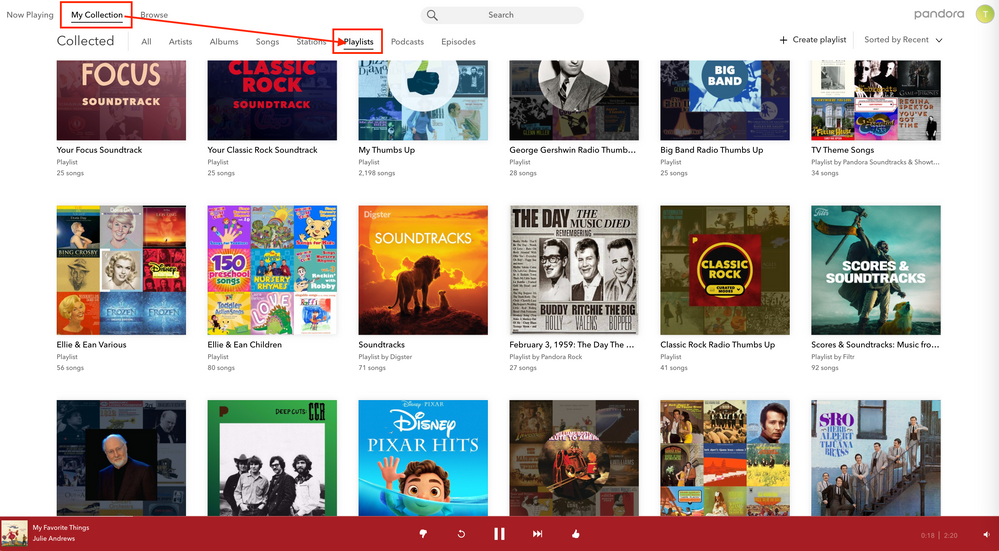
Can you confirm that you are logged into the correct account?
Additionally, can you please send me a screenshot of what you are seeing when you sort your collection by Playlists?
Thanks for working with me on this. 🤝
Adam | Community Moderator
New to the Community? Introduce yourself here
New music alert! Picks of the Week (12.15.25)
- Mark as New
- Bookmark
- Subscribe
- Mute
- Subscribe to RSS Feed
- Permalink
- Report Inappropriate Content
Stations, but when I look at the Playlists it says You don't have any
playlists yet...
- Mark as New
- Bookmark
- Subscribe
- Mute
- Subscribe to RSS Feed
- Permalink
- Report Inappropriate Content
@spreng What is the make and model of the device you are using?
Additionally, can you please send me a screenshot of what you are seeing?
Thanks again!
Adam | Community Moderator
New to the Community? Introduce yourself here
New music alert! Picks of the Week (12.15.25)
- Mark as New
- Bookmark
- Subscribe
- Mute
- Subscribe to RSS Feed
- Permalink
- Report Inappropriate Content
- Mark as New
- Bookmark
- Subscribe
- Mute
- Subscribe to RSS Feed
- Permalink
- Report Inappropriate Content
@spreng I recommend running through the following troubleshooting steps: Troubleshooting for Android Devices
Let me know how it goes.
Adam | Community Moderator
New to the Community? Introduce yourself here
New music alert! Picks of the Week (12.15.25)
- Mark as New
- Bookmark
- Subscribe
- Mute
- Subscribe to RSS Feed
- Permalink
- Report Inappropriate Content
please get me to someone I can talk to?
- Mark as New
- Bookmark
- Subscribe
- Mute
- Subscribe to RSS Feed
- Permalink
- Report Inappropriate Content
@spreng No worries - here are the troubleshooting steps you can try out:
From your Android Settings, please try clearing the Pandora app data using the following steps (not to worry, we'll keep track of your profile and collection for you):*
- Open your device Settings
- Tap Apps
- Scroll down to find Pandora
- Select Storage
- On the storage details page tap Clear Data.
Keep in mind that the steps for each Android device is slightly different. If you have a Pixel, you can check out Google's help page for steps on how to clear space on your device.
Please note that you will be asked to log into your account after completing these steps.
Let me know how it goes.
Adam | Community Moderator
New to the Community? Introduce yourself here
New music alert! Picks of the Week (12.15.25)
- Mark as New
- Bookmark
- Subscribe
- Mute
- Subscribe to RSS Feed
- Permalink
- Report Inappropriate Content
Clearing the data brought back all of the Playlists, resolving the problem.
- Mark as New
- Bookmark
- Subscribe
- Mute
- Subscribe to RSS Feed
- Permalink
- Report Inappropriate Content
Happy to hear it, @spreng.
Enjoy the music! 🎶
Adam | Community Moderator
New to the Community? Introduce yourself here
New music alert! Picks of the Week (12.15.25)
- Mark as New
- Bookmark
- Subscribe
- Mute
- Subscribe to RSS Feed
- Permalink
- Report Inappropriate Content
A while back I had upgraded my premium package to the family plan, since then my playlists have disappeared. How do I get them back?
- Mark as New
- Bookmark
- Subscribe
- Mute
- Subscribe to RSS Feed
- Permalink
- Report Inappropriate Content
@Kaylahill2017 I took a look at your account on my end and I see a number of your playlists are still listed in your collection:
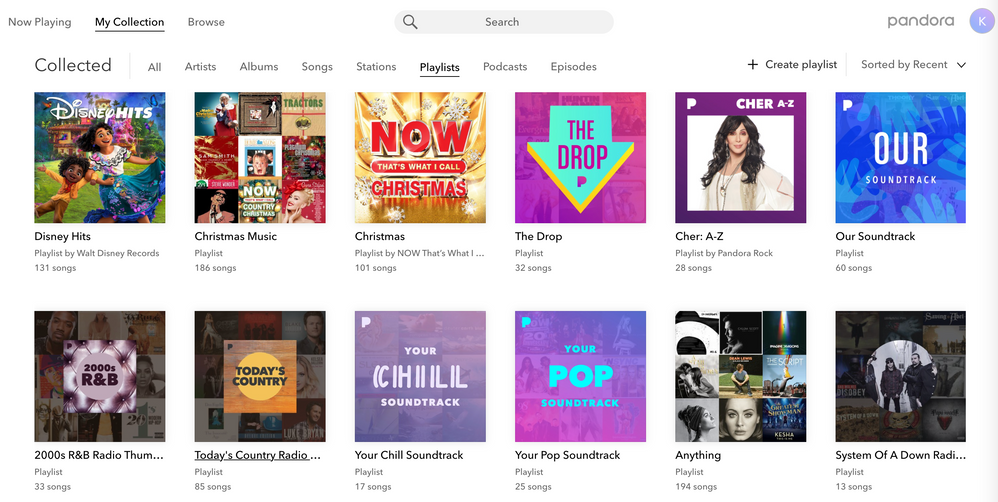
Can you please do me a favor an send me a screenshot of what you are seeing when you sort your collection by Playlists?
Thanks for working with me on this. 🤝
Adam | Community Moderator
New to the Community? Introduce yourself here
New music alert! Picks of the Week (12.15.25)
