Turn on suggestions
Auto-suggest helps you quickly narrow down your search results by suggesting possible matches as you type.
- Pandora Community
- :
- Listener Lounge
- :
- Community Chat
- :
- Re: 📬 Update: Private Messenger Consent
Options
- Subscribe to RSS Feed
- Mark Post as New
- Mark Post as Read
- Float this Post for Current User
- Bookmark
- Subscribe
- Mute
- Printer Friendly Page


- Mark as New
- Bookmark
- Subscribe
- Mute
- Subscribe to RSS Feed
- Permalink
- Report Inappropriate Content
Hi everyone 👋
We’ve made an important update to Private Messaging. If you're having trouble accessing your private messages, you must accept our Private Messenger Consent Agreement to use this feature.
To do so:
-
Click your profile picture, then select My Settings.
-
Head to the Personal tab.
-
Open Private Messenger.
-
Read and accept the agreement. Click Confirm.
-
After accepting, you'll see a message indicating your Private Messenger has been enabled.
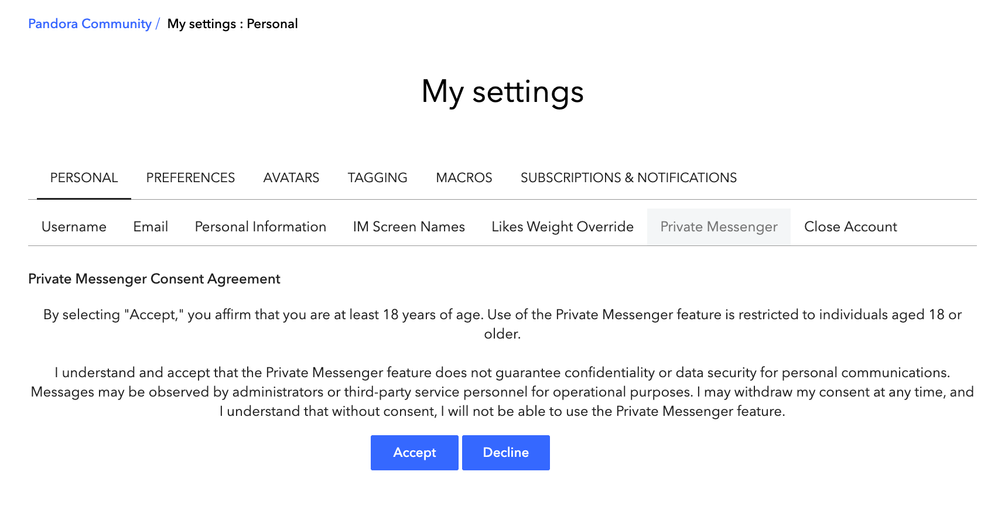
Once complete, your private messaging will resume as normal. 📬
Alyssa | Community Manager
Join the discussion in Community Chat
Your turn: Q: What genre grew on you over time?
Check out: Pandora for Creators Community
Share yours: Q: What's your sound color? ✨
4 Replies

- Mark as New
- Bookmark
- Subscribe
- Mute
- Subscribe to RSS Feed
- Permalink
- Report Inappropriate Content
Could you help me i would send a screenshot but it won't let me and there is no option to press private messages

- Mark as New
- Bookmark
- Subscribe
- Mute
- Subscribe to RSS Feed
- Permalink
- Report Inappropriate Content
Yeah I can't see it and I clicked on my pfp and if didn't show anything
- Mark as New
- Bookmark
- Subscribe
- Mute
- Subscribe to RSS Feed
- Permalink
- Report Inappropriate Content
We're both experimenting the same problem lol
- Mark as New
- Bookmark
- Subscribe
- Mute
- Subscribe to RSS Feed
- Permalink
- Report Inappropriate Content
Yeah thats what I'm saying
