Turn on suggestions
Auto-suggest helps you quickly narrow down your search results by suggesting possible matches as you type.
- Pandora Community
- :
- Support
- :
- Desktop
- :
- Re: Desktop App + Web: Error "We're having trouble...
Options
- Subscribe to RSS Feed
- Mark Post as New
- Mark Post as Read
- Float this Post for Current User
- Bookmark
- Subscribe
- Mute
- Printer Friendly Page

07-14-2025
06:56 AM
- Mark as New
- Bookmark
- Subscribe
- Mute
- Subscribe to RSS Feed
- Permalink
- Report Inappropriate Content
Recently (around July 10th) Pandora music started shutting down unexpectedly and displaying the message that read "We'er having trouble playing audio on this device." This was after years of uninterrupted and satisfactory service.
Trying various troubleshooting suggestions provided by Pandora Support has not fixed the issue.
Has anyone else experienced this problem?
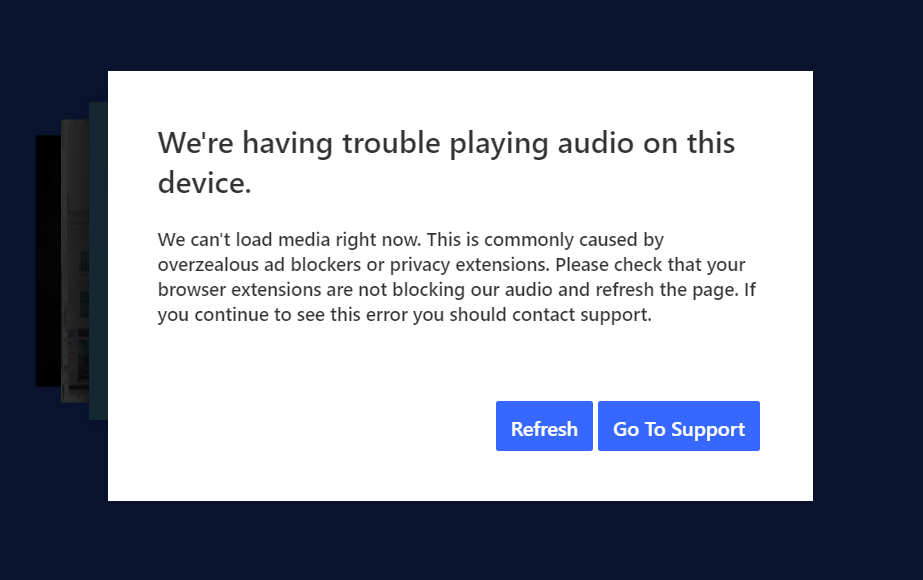
mod edit: updated title for clarity
141 Replies

- Mark as New
- Bookmark
- Subscribe
- Mute
- Subscribe to RSS Feed
- Permalink
- Report Inappropriate Content
I just started getting this issue a week ago. At first it was every couple of songs, now I can't even play a single song. I have gone through the troubleshooting steps in the Go To Support link and am still experiencing the issue. I am trying to listen via Chrome Version 140.0.7339.214 on a Mac running 14.7.1. I don't feel really great paying for a service that doesn't work even a little bit. Are you working on this, Pandora?


- Mark as New
- Bookmark
- Subscribe
- Mute
- Subscribe to RSS Feed
- Permalink
- Report Inappropriate Content
Hi @greenvandan , welcome to the Pandora Community!
Thanks for posting and sorry for the trouble.
Can you give me a bit more information about this?
- What were you listening to when playback stopped (Station, Album, Playlist, or Podcast)?
- Have you tried listening through the Pandora Desktop App?
- Were you able to resume playback receiving this error?
Let me know!

- Mark as New
- Bookmark
- Subscribe
- Mute
- Subscribe to RSS Feed
- Permalink
- Report Inappropriate Content
I've been getting this error for months now. First started on Brave, then I downloaded Chrome and Firefox, and finally I downloaded the desktop app a few days ago and still getting this error.



- Mark as New
- Bookmark
- Subscribe
- Mute
- Subscribe to RSS Feed
- Permalink
- Report Inappropriate Content
Been going on for months now. Super frustrating. Chated with support and got a "we'll pass your information along."
No Ad blocker. No overly aggresive firewall. Norton 360 seems to be set up right. Have checked router settings and they look fine but that shouldn't be an issue anyways as my laptop, sonos, and pixels - all on the same network - aren't impacted.
Playback Experience:
- What were you listening to when playback stopped (Station, Album, Playlist, or Podcast)?
- Playlists - that's all I listen to on Pandora so I don't know if it is happening elsewhere.
- I've only ever had it fail between songs. It feels like the song buffers in its entirety, then sometime during playing that song, the connection is lost and Pandora can't pick up the next track.
- Were you listening through the Pandora website or the Pandora Desktop App?
- Yes. Both the web version and the Desktop App suffer the same issue.
- However, this only happens on one of my PCs. Pandora works fine on all our Android (Pixel) devices as well as on our Sonos and my Windows 11 laptop.
- If the website, which browser were you using (Chrome, Firefox, Edge)?
- I primarily use Chrome but can confirm it is happening on Firefox and Edge as well. And, as noted above, in the Pandora Desktop app
- Incognito mode doesn't seem to help and I've done all the troubleshooting steps suggested on the support site. No dice.
- Were you able to resume playback afterward?
- Sometimes. But it always happens again.
- I find using a hard refresh of the page - Ctrl + F5 - seems to be more effective at recovering from a hang than anything else.
- Interestingly, the failures seem to be progressive. Meaning the number of songs between failures seems to decrease the longer I suffer through the constant refreshes. It might go 10+ songs the first time I start playing after an extended period not using it. Then, during that same session, the next refresh might get me 5 or 6 songs before failing. Then 2 for a couple times then 1 or none (immediately pops the same error message) from there on out.
Device Information:
- What is the make and model of your computer?
- What operating system are you running (e.g. Windows 10, Windows 11)?
OS Name Microsoft Windows 11 Pro
Version 10.0.26100 Build 26100
Other OS Description Not Available
OS Manufacturer Microsoft Corporation
System Name XXXXXXXXX
System Manufacturer Alienware
System Model Alienware Aurora R12
System Type x64-based PC
System SKU 0A63
Processor 11th Gen Intel(R) Core(TM) i9-11900KF @ 3.50GHz, 3401 Mhz, 8 Core(s), 16 Logical Processor(s)
BIOS Version/Date Alienware 1.1.28, 11/5/2024
SMBIOS Version 3.1
Embedded Controller Version 255.255
BIOS Mode UEFI
BaseBoard Manufacturer Alienware
BaseBoard Product 0P0JWX
BaseBoard Version A00
Platform Role Desktop
Secure Boot State On
PCR7 Configuration Elevation Required to View
Windows Directory C:\WINDOWS
System Directory C:\WINDOWS\system32
Boot Device \Device\HarddiskVolume3
Locale United States
Hardware Abstraction Layer Version = "10.0.26100.1"
User Name XXXXXXXXX
Time Zone Pacific Daylight Time
Installed Physical Memory (RAM) 64.0 GB
Total Physical Memory 63.7 GB
Available Physical Memory 34.5 GB
Total Virtual Memory 67.7 GB
Available Virtual Memory 22.0 GB
Page File Space 4.00 GB

- Mark as New
- Bookmark
- Subscribe
- Mute
- Subscribe to RSS Feed
- Permalink
- Report Inappropriate Content
I'm also having the same issue. I have Pandora Plus, I was listening on Safari 16.6 on my MacBook Pro, and adjusted my extensions and settings to allow Pandora to use pop-ups and autoplay any media. Even after making changes, updating my OS, and restarting the browser it kept happening. I switched to Chrome Version 141.0.7390.67, and added Pandora as an allowed site according to Pandora's Help instructions. It KEPT HAPPENING. So I downloaded the desktop app yesterday and started using that, and that worked for a while but after 2-5 songs the issue is STILL happening.
Playback Experience
- What were you listening to when playback stopped? - Station
- Were you listening through the Pandora website or the Pandora Desktop App? - Website and Desktop App
- If the website, which browser (Chrome, Firefox, Edge)? - Chrome and Safari
- Were you able to resume playback afterward? - After refreshing, the web browser would only play one more song before the alert showed up again. The Desktop App sometimes would play a half an hour of music, or sometimes only one song.
Device information
- What is the make and model of your computer? 2017 MacBook Pro
- What operating system are you running? Ventura 13.7.8
- If Windows, which version (e.g., Windows 10, Windows 11)?

- Mark as New
- Bookmark
- Subscribe
- Mute
- Subscribe to RSS Feed
- Permalink
- Report Inappropriate Content
I'll tell you what worked for me....
DO NOT PLAY MUSIC FROM THE "NOW PLAYING" TAB
Instead, listen from the "My collection" tab
There is something wrong with the functionality of the big screen "now playing" mode. As long as what is "now playing" is minimized at the bottom of the screen, you're good to go.
- Mark as New
- Bookmark
- Subscribe
- Mute
- Subscribe to RSS Feed
- Permalink
- Report Inappropriate Content
Hi @loopsparky , thanks for sharing this with us!
Can you tell me a bit about your setup and about your experience?
- Do you have a Windows or a Mac computer?
- Are you listening from your web browser? Which one is the one that you use?
- Can you listen to any type of content, whether it is a station, song album or playlist, as long as you are not on the Now Playing tab?
- Do you see the error message the moment you open the now playing tab? Or after listening some songs? Or when listening a specific type of content on the Now Playing tab?
Thanks for your help with this!
- Mark as New
- Bookmark
- Subscribe
- Mute
- Subscribe to RSS Feed
- Permalink
- Report Inappropriate Content
Was this in a browser or the App? I tried in the app (Windows 11) and it worked for awhile, then got the same error. 😞
I was so hopeful!
- Mark as New
- Bookmark
- Subscribe
- Mute
- Subscribe to RSS Feed
- Permalink
- Report Inappropriate Content
Windows 11
Web browser
I have only been listening to different stations
When you go back to the Now Playing tab it takes a couple of song to get the error message again.
Chrome Browser, Windows 11 also.
I am 2 hours into listening without interruption now.
Moderator's edit: Merged comments.

- Mark as New
- Bookmark
- Subscribe
- Mute
- Subscribe to RSS Feed
- Permalink
- Report Inappropriate Content
Has this cleared up for anyone? I'm still having this problem.
- Mark as New
- Bookmark
- Subscribe
- Mute
- Subscribe to RSS Feed
- Permalink
- Report Inappropriate Content
I did encounter a problem with this method once so far. I switched back to Now Playing and then back to My Collection and its going fine.

- Mark as New
- Bookmark
- Subscribe
- Mute
- Subscribe to RSS Feed
- Permalink
- Report Inappropriate Content
Yes, over and over!
Repeatedly!
Moderator's edit: Merged comments.

- Mark as New
- Bookmark
- Subscribe
- Mute
- Subscribe to RSS Feed
- Permalink
- Report Inappropriate Content
This error has occurred consistently over the past two months.
Playback Experience
- What were you listening to when playback stopped
- Seems like it occurs on stations most often, although it could have also happened with a play list.
- Were you listening through the Pandora website or the Pandora Desktop App?
- Occurs with both. It started with Chrome, but upon the bot suggestion to use the app I downloaded it and it happens there too.
- If the website, which browser?
- Chrome
- Were you able to resume playback afterward?
- Sometimes it takes multiple clicks of the refresh button other times just one other times restarting the app/browser.
Device information
- What is the make and model of your computer?
- Dell Inspiron Laptop (Work), Custom (Home)
- What operating system are you running?
- Windows 11
As noted by another poster. This is not a hardware issue, it is a pandora issue and something that was changed in the back end. I consider myself pretty tech savvy and all of the cache clearing/reinstalls seem to have no effect on the frequency of the errors.

- Mark as New
- Bookmark
- Subscribe
- Mute
- Subscribe to RSS Feed
- Permalink
- Report Inappropriate Content
I am getting the same - any solution?

- Mark as New
- Bookmark
- Subscribe
- Mute
- Subscribe to RSS Feed
- Permalink
- Report Inappropriate Content
What is the solution to this issue?
You just keep replying with the same set of questions. For an issue going on at least 3 months, I would think there would be a little more information to share about this problem
Moderator's edit: Merged comments.
- Mark as New
- Bookmark
- Subscribe
- Mute
- Subscribe to RSS Feed
- Permalink
- Report Inappropriate Content
Hello! I've also had this issue for a few months. At first, I thought it was my terrible internet, which legitimately would cut out for a few seconds several times each day. This would also cause me to lose my remote desktop connection to work. I switched providers to fiber a couple of months ago. This solved all cutting out problems on my work and personal computers but this issue remains for Pandora.
- I almost exclusively listen to radio.
- I only listen through the app on my Windows laptop.
- Interestingly, I haven't experienced this issue from my iPad.
- I can almost always immediately resume playing music once I click refresh and play.
- My computer is a Dell Inspiron 7440 2-in-1
- Running Windows 11 Home
- Currently running version: 10.0.26100 Build 26100
Thank you for working to fix this!
- Mark as New
- Bookmark
- Subscribe
- Mute
- Subscribe to RSS Feed
- Permalink
- Report Inappropriate Content
Same issue: 16 Oct. 2025
Windows Desktop
Website access (www.pandora.com)
Chrome: Version 141.0.7390.108 (Official Build) (64-bit)
Only two extensions running: Lightshot, Adobe Acrobat
Pandora Plus Subscriber
Error pop-up. Click the refresh button in the pop-up until the next pop-up (approx. 20 min)
- Mark as New
- Bookmark
- Subscribe
- Mute
- Subscribe to RSS Feed
- Permalink
- Report Inappropriate Content
Sorry they haven't fixed it. I just canceled my subscription. Pandora will only listen when they start losing money.
Went to Spotify, and there's been no problems at all.
Pandora, next time don't ignore your paying customers, or eventually you won't have any left.
- Mark as New
- Bookmark
- Subscribe
- Mute
- Subscribe to RSS Feed
- Permalink
- Report Inappropriate Content
For ME YESSSSS!!!!!!!! THIS IS WHAT IT IS SAYING "We can't load media right now. This is commonly caused by overzealous ad blockers or privacy extensions. Please check that your browser extensions are not blocking our audio and refresh the page. If you continue to see this error you should contact support." I do not know what to do I just want to listen to my storys

- Mark as New
- Bookmark
- Subscribe
- Mute
- Subscribe to RSS Feed
- Permalink
- Report Inappropriate Content
I use one of my computers to only play one station (Schiller Radio) on Pandora. That is ALL this computer does every day. One station. One computer that does nothing else! Been doing that for years. Now, despite using Bing, or Google browsers or the App, the station plays for a little while and just quits. Error Message: "We're having trouble playing audio on this device". The refresh button on the message works sometimes, but I usually end up using the refresh button on top of the web page. Then it plays again for a little while and gives me the same error message.
Then I just shut down or restart the computer. I have tried multiple ways to fix this with the help of the Bot and Co-Pilot, but nothing seems to be working. This seems like it is more of a Pandora problem than my computer which has Bing and Google up to date. I pay every month to listen to Pandora without any hassles. I'm getting pretty frustrated with it right now. It plays in my car just fine without stopping. Help!
