Turn on suggestions
Auto-suggest helps you quickly narrow down your search results by suggesting possible matches as you type.
- Pandora Community
- :
- Support
- :
- Desktop
- :
- (RESOLVED) Desktop App + Web: Error "We're having ...
Options
- Subscribe to RSS Feed
- Mark Post as New
- Mark Post as Read
- Float this Post for Current User
- Bookmark
- Subscribe
- Mute
- Printer Friendly Page

07-14-2025
06:56 AM
- Mark as New
- Bookmark
- Subscribe
- Mute
- Subscribe to RSS Feed
- Permalink
- Report Inappropriate Content
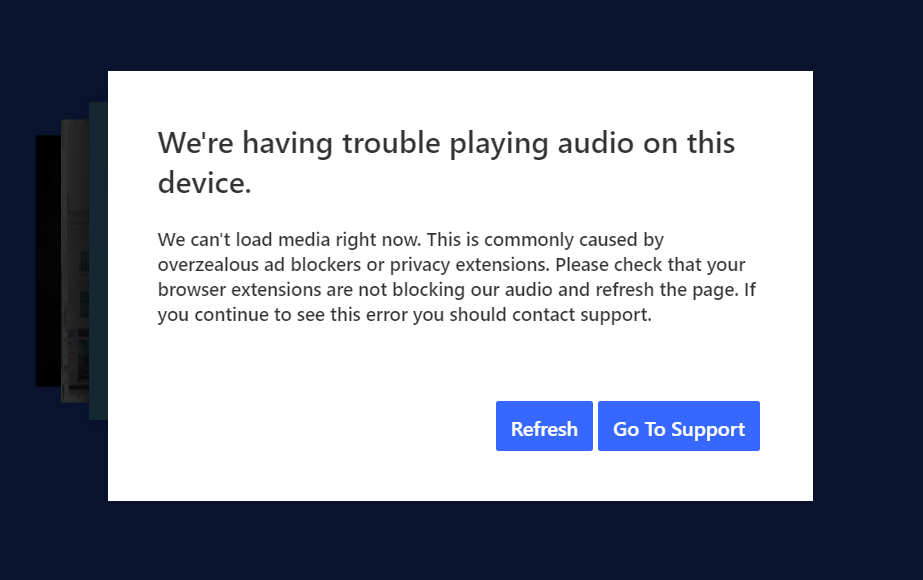
Recently (around July 10th) Pandora music started shutting down unexpectedly and displaying the message that read "We'er having trouble playing audio on this device." This was after years of uninterrupted and satisfactory service.
Trying various troubleshooting suggestions provided by Pandora Support has not fixed the issue.
Has anyone else experienced this problem?
mod edit: updated title for clarity
141 Replies

- Mark as New
- Bookmark
- Subscribe
- Mute
- Subscribe to RSS Feed
- Permalink
- Report Inappropriate Content
Why is this marked as solved? Is anyone actually looking into this?

- Mark as New
- Bookmark
- Subscribe
- Mute
- Subscribe to RSS Feed
- Permalink
- Report Inappropriate Content
We can't load media right now. This is commonly caused by overzealous ad blockers or privacy extensions. Please check that your browser extensions are not blocking our audio and refresh the page. If you continue to see this error you should contact support.
Music will play for hours at a time, but then this will show up repeatedly.
- Mark as New
- Bookmark
- Subscribe
- Mute
- Subscribe to RSS Feed
- Permalink
- Report Inappropriate Content
On top of what I previously posted, I had at least ten consecutive songs load up on one of my stations that had nothing to do with my station, and none of the artists have any songs saved on any station that I use, and there was no error message. However, when one of the songs that I did have saved tried to play, I got the error message. When I refreshed the browser on the upper left, I was logged out. When I logged back in, I was sent to a different station, and it played one of the saved songs, but then when I went back to the original station that I was listening to, the error message came up again.
To repeat what I've said before, it will play for hours with no errors, and then do what I said in the paragraph above. I don't think ad blockers or anything else randomly pops up and consistently stops the music being played.
0
Kudos
Reply
- Mark as New
- Bookmark
- Subscribe
- Mute
- Subscribe to RSS Feed
- Permalink
- Report Inappropriate Content
Why is this thread marked as a solution? There is no solution here. It's a group of people experiencing the same issue and getting ignored by Pandora.
- Mark as New
- Bookmark
- Subscribe
- Mute
- Subscribe to RSS Feed
- Permalink
- Report Inappropriate Content
I use Chrome for Pandora and switched to Edge. Still getting the same message.
- Mark as New
- Bookmark
- Subscribe
- Mute
- Subscribe to RSS Feed
- Permalink
- Report Inappropriate Content
Tick Tock....tick tock...oh, Timothy...why did you go....
0
Kudos
Reply


- Mark as New
- Bookmark
- Subscribe
- Mute
- Subscribe to RSS Feed
- Permalink
- Report Inappropriate Content
Hi @ericrparton , thanks for posting.
Can you tell me more about your device or devices where this is happening?
- Are you on a Mac or windows computer?
- What version of Windows or MacOS are you using?
- Does it happens also when you use Firefox?
In the meantime, if you haven't, please try the steps from the links below:
- For your Google Chrome browser, please try out these steps.
- If you're using Edge, please use these steps.
Alternatively, please try installing the Pandora desktop app.
Let me know how it goes and if you need the instructions to download the app on your computer.
- Mark as New
- Bookmark
- Subscribe
- Mute
- Subscribe to RSS Feed
- Permalink
- Report Inappropriate Content
Adding my name to the list. Been happening for weeks now. Trying a private browser now to see if it helps.
UPDATE: nope, it didn't help
- Mark as New
- Bookmark
- Subscribe
- Mute
- Subscribe to RSS Feed
- Permalink
- Report Inappropriate Content
I'm using Windows 11. Yesterday, it only happened once. Today, it has been at least twice. I would think that if it was a problem on my end, that I would not be able to listen to anything consistently. Yesterday went pretty well, considering how most days go.
- Mark as New
- Bookmark
- Subscribe
- Mute
- Subscribe to RSS Feed
- Permalink
- Report Inappropriate Content
I'm still having this issue. Is there an updated solution? What has been suggested is not working

- Mark as New
- Bookmark
- Subscribe
- Mute
- Subscribe to RSS Feed
- Permalink
- Report Inappropriate Content
Hello, I have been receiving this error randomly on the desktop app. It seems to occur after a couple hours of continuous playback. Pressing refresh button usually gets things going for a while but error comes back. There are times that refreshing doesn't help and I get the same error consecutively, but changing to next track will clear the error in that situation.
I don't have an ad blocker for the app. I have a Pandora Plus subscription.

0
Kudos
Reply

- Mark as New
- Bookmark
- Subscribe
- Mute
- Subscribe to RSS Feed
- Permalink
- Report Inappropriate Content
"solved" - we don't care anymore. Nice job Pandora support.
- Mark as New
- Bookmark
- Subscribe
- Mute
- Subscribe to RSS Feed
- Permalink
- Report Inappropriate Content
Yes, this is happening to me too. Since mid July. Pandora has not fixed it yet, it is very frustrating. Many others are reporting it also (see other threads). Has anything changed on your end that would possibly explain why yours is just starting now? Curious, are you on an older OS?
I get this same exact error on the Chrome browser, the Desktop App, and even in Safari. Same exact error. Plays for several songs, then delivers the error.
Curiously, it plays a different number of songs each time before delivering the error message, there seems to be no rhyme or reason. I have been trying to solve this for 2 months, and have lost faith that Pandora cares. But I am happy to bounce ideas here to try to solve this mystery. You are not alone!
0
Kudos
Reply

- Mark as New
- Bookmark
- Subscribe
- Mute
- Subscribe to RSS Feed
- Permalink
- Report Inappropriate Content
How is this a solution to anything?
- Mark as New
- Bookmark
- Subscribe
- Mute
- Subscribe to RSS Feed
- Permalink
- Report Inappropriate Content
Hi, still struggling with this issue. It is not "solved". Can you unmark this thread as "solved" since it appears many are still experiencing this issue?
I am experiencing this error on Chrome Browser, Desktop App, and Safari. Same error every time. "We are having trouble playing audio on this device." When I hit "refresh", it sometimes starts playing the music again. Sometimes, it buffers and won't play the music again. Sometimes it plays one song, then delivers the error again. Sometimes it plays 5 songs, then delivers the error again. It's different each time. There is no rhyme or reason to it.
The issue does not affect iPhone app, that plays fine.
I have tried all the recommended fixes in your solution thread, without success.
I am on an iMac running an older OS that I cannot upgrade. Version 10.12.6. Which never presented an issue in the past (I am a longtime Plus user). Others are reporting the same issue, and have been for several months, on a variety of browsers and operating systems. It appears to be specifically related to the desktop app and browser streaming. Please help us resolve this issue.
0
Kudos
Reply

- Mark as New
- Bookmark
- Subscribe
- Mute
- Subscribe to RSS Feed
- Permalink
- Report Inappropriate Content
This is NOT resolved. I get this error message in multiple browsers, but not on every device.
When I got the message that it cannot play this morning, I saw multiple net::ERR_NAME_NOT_RESOLVED errors in the Chrome Console that it couldn't reach t3-2.p-cdn.us:

When a reload was finally successful in playing music, I saw it accessing the same path under a different domain, either pandora.com or a different p-cdn.us subdomain:


I'm on a Windows 11 Enterprise desktop PC, connected with an ethernet cable. Problem occurs in both Chrome and Firefox. I am allowing all cookies on Pandora, and I do not have any ad blockers.
Since I started monitoring it this morning, the error has occurred when it tries to access
- t3-2.p-cdn.us
- t3-5.p-cdn.us
- t3-1.p-cdn.us
- t2-1.p-cdn.us
- Mark as New
- Bookmark
- Subscribe
- Mute
- Subscribe to RSS Feed
- Permalink
- Report Inappropriate Content
Can confirm -
Using Windows 11 Pro, Chrome (Most recent stable version), seeing this error pop-up and the console shows:

While I do have AdBlock Pro extension installed, it is disabled for Pandora and should not be causing a problem.
This would indicate Pandora itself has some errant or old code that has not been removed or did not make sure their DNS entries are up to date.
- Mark as New
- Bookmark
- Subscribe
- Mute
- Subscribe to RSS Feed
- Permalink
- Report Inappropriate Content
For those of you following this - You should be able to pull up the Browser Console when you are on a page.
Shift-Ctrl-J (or Cmd-Opt-J) will call up the browser console for most browsers.
0
Kudos
Reply
- Mark as New
- Bookmark
- Subscribe
- Mute
- Subscribe to RSS Feed
- Permalink
- Report Inappropriate Content
I tracked this for most of my work day, hoping to see a pattern. Unfortunately, some addresses worked at one point and failed later, or vice versa.
I don't know what this means for Pandora trying to track down the issue, but the error is consistent-- ERR_NAME_NOT_RESOLVED is what blocks the music from flowing.
0
Kudos
Reply
- Mark as New
- Bookmark
- Subscribe
- Mute
- Subscribe to RSS Feed
- Permalink
- Report Inappropriate Content
Looking further into this, I did an nslookup on those names, and my computer does output back IPs (Both IPv4 and IPv6)
t3-2.p-cdn.us returns - 209.196.209.25 with ipv6 of 2620:106:e00a:f00f::25
t3-5 returns 208.85.46.29 with the same ipv6 as t3-2
t3-1 returns 208.85.42.28 with ipv6 of 2620:106"e001:f00f::29
t2-1 returns 208.85.46.25 with ipv6 of 2620:106:e00a:f00f::24
So the names evaluate to a destination with my DNS server, and I did not do a DNS Flush either, so this isn't a cache issue.
Something funky is going on with how those t#-#.p-cdn.com servers are acting or responding that are causing errors, imho.
0
Kudos
Reply
