Turn on suggestions
Auto-suggest helps you quickly narrow down your search results by suggesting possible matches as you type.
- Pandora Community
- :
- Support
- :
- My Collection
- :
- Re: How to get a text listing of stations
Options
- Subscribe to RSS Feed
- Mark Post as New
- Mark Post as Read
- Float this Post for Current User
- Bookmark
- Subscribe
- Mute
- Printer Friendly Page

- Mark as New
- Bookmark
- Subscribe
- Mute
- Subscribe to RSS Feed
- Permalink
- Report Inappropriate Content
I can't find a way to get just a text listing of my stations/collection. It comes up with big thumbnails that interfere with an efficient reading of the list. Can someone please help? Any help appreciated. I'm using a Windows 10 PC at current Rev.
Thanks in advance
Moderator Edit: Edited title for clarity
1 Solution
Accepted Solutions


- Mark as New
- Bookmark
- Subscribe
- Mute
- Subscribe to RSS Feed
- Permalink
- Report Inappropriate Content
@namuh To get a list order of your collected stations, what you can do is sort your collection alphabetically.
To do this, click on My Collection > Stations > Sorted by A-Z:
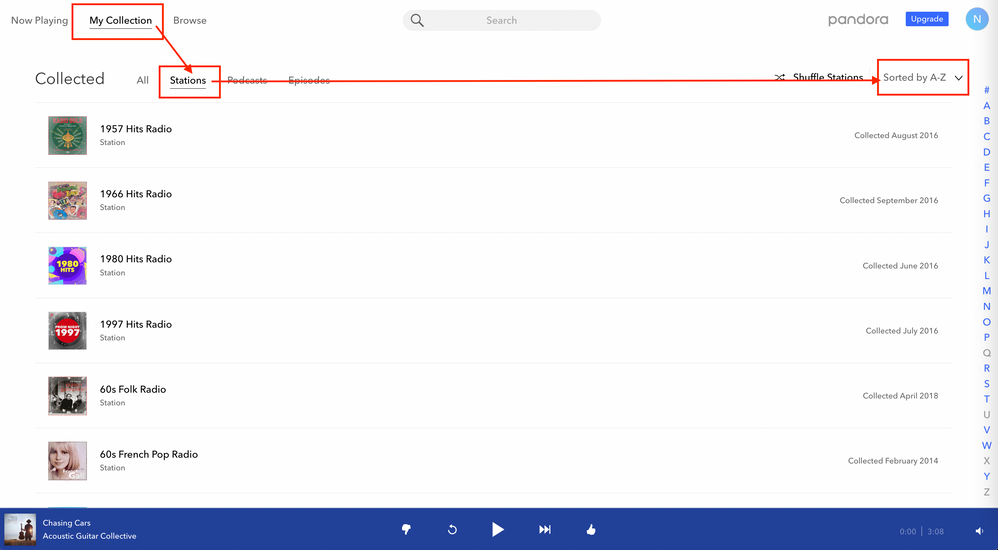
Hope this helps!
Adam | Community Moderator
New to the Community? Introduce yourself here
New music alert! Picks of the Week (5.26.26)
3 Replies
- Mark as New
- Bookmark
- Subscribe
- Mute
- Subscribe to RSS Feed
- Permalink
- Report Inappropriate Content
@namuh To get a list order of your collected stations, what you can do is sort your collection alphabetically.
To do this, click on My Collection > Stations > Sorted by A-Z:
Hope this helps!
Adam | Community Moderator
New to the Community? Introduce yourself here
New music alert! Picks of the Week (5.26.26)
- Mark as New
- Bookmark
- Subscribe
- Mute
- Subscribe to RSS Feed
- Permalink
- Report Inappropriate Content
THANKS YOU! Solution is perfect for my needs!
- Mark as New
- Bookmark
- Subscribe
- Mute
- Subscribe to RSS Feed
- Permalink
- Report Inappropriate Content
Always happy to help, @namuh. 😎
Enjoy the music!
Adam | Community Moderator
New to the Community? Introduce yourself here
New music alert! Picks of the Week (5.26.26)
