Turn on suggestions
Auto-suggest helps you quickly narrow down your search results by suggesting possible matches as you type.
- Pandora Community
- :
- Support
- :
- Desktop
- :
- Re: Control buttons disappeared from now playing s...
Options
- Subscribe to RSS Feed
- Mark Post as New
- Mark Post as Read
- Float this Post for Current User
- Bookmark
- Subscribe
- Mute
- Printer Friendly Page
- Mark as New
- Bookmark
- Subscribe
- Mute
- Subscribe to RSS Feed
- Permalink
- Report Inappropriate Content
Hello! I listen to Pandora on the web at work. I have a premium account. My preferred station is to just shuffle everything. But today I logged on and notice that when on the "Now Playing" screen, there are no longer any control buttons to skip, pause, thumbs up or down like there used to be. In fact, I have no idea how to pause it from here without the button visible/accessible. Was this a deliberate change or are there currently issues? Thanks!
Moderator Edit: Edited title for clarity
1 Solution
Accepted Solutions


- Mark as New
- Bookmark
- Subscribe
- Mute
- Subscribe to RSS Feed
- Permalink
- Report Inappropriate Content
@Gelicka I moved your post over to the Desktop space.
I was unable to reproduce this issue on my end - I launched your account in Shuffle Mode, and do see all of the control buttons at the bottom of the screen:
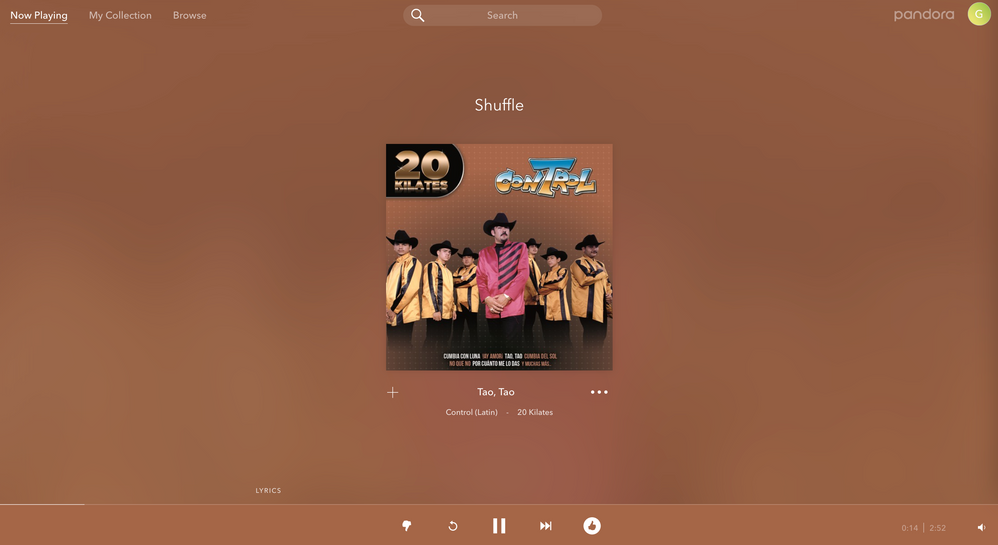
Could you tell me a bit more about what is happening?
- If you are on a computer, are you listening from:
- A Mac or Windows computer?
- Our website, or the desktop app? If you're listening from our website, what browser are you using?
- Is there an error message? If so, what does it say?
- Can you provide me with a screenshot of what you're seeing?
Thanks for working with me on this. 🤝
Adam | Community Moderator
New to the Community? Introduce yourself here
New music alert! Picks of the Week (5.26.26)
5 Replies
- Mark as New
- Bookmark
- Subscribe
- Mute
- Subscribe to RSS Feed
- Permalink
- Report Inappropriate Content
@Gelicka I moved your post over to the Desktop space.
I was unable to reproduce this issue on my end - I launched your account in Shuffle Mode, and do see all of the control buttons at the bottom of the screen:
Could you tell me a bit more about what is happening?
- If you are on a computer, are you listening from:
- A Mac or Windows computer?
- Our website, or the desktop app? If you're listening from our website, what browser are you using?
- Is there an error message? If so, what does it say?
- Can you provide me with a screenshot of what you're seeing?
Thanks for working with me on this. 🤝
Adam | Community Moderator
New to the Community? Introduce yourself here
New music alert! Picks of the Week (5.26.26)
- Mark as New
- Bookmark
- Subscribe
- Mute
- Subscribe to RSS Feed
- Permalink
- Report Inappropriate Content
Hello! My computer was just tripping. All is well! Thanks for responding!


- Mark as New
- Bookmark
- Subscribe
- Mute
- Subscribe to RSS Feed
- Permalink
- Report Inappropriate Content
Glad to hear everything is back to normal @Gelicka!
Happy listening! 🎧

- Mark as New
- Bookmark
- Subscribe
- Mute
- Subscribe to RSS Feed
- Permalink
- Report Inappropriate Content

here is the screen shot you wanted

- Mark as New
- Bookmark
- Subscribe
- Mute
- Subscribe to RSS Feed
- Permalink
- Report Inappropriate Content
Although the OP reported it was "fixed" because his computer was "just tripping" (which is what computers like to do sometimes,) I wanted to post what I found when I had this problem:
When I experienced this, my browser was at the full extent of my monitor, but was not "maximized." By that I mean that the maximize button in the upper-right corner of the browser was a square, not two squares.

I could also see the song progress bar sliding across the very bottom of the browser window as the song played.
As soon as I clicked the maximize button, my normal Pandora controls showed back up on the bottom of the browser where they normally are.
So, if anyone else experiences this issue, try resizing your browser window even just a little bit. That will cause the webpage to readjust everything and your controls should reappear.
