Turn on suggestions
Auto-suggest helps you quickly narrow down your search results by suggesting possible matches as you type.
- Pandora Community
- :
- Support
- :
- Desktop
- :
- Re: Desktop App + Web: Error "We're having trouble...
Options
- Subscribe to RSS Feed
- Mark Post as New
- Mark Post as Read
- Float this Post for Current User
- Bookmark
- Subscribe
- Mute
- Printer Friendly Page

07-14-2025
06:56 AM
- Mark as New
- Bookmark
- Subscribe
- Mute
- Subscribe to RSS Feed
- Permalink
- Report Inappropriate Content
Recently (around July 10th) Pandora music started shutting down unexpectedly and displaying the message that read "We'er having trouble playing audio on this device." This was after years of uninterrupted and satisfactory service.
Trying various troubleshooting suggestions provided by Pandora Support has not fixed the issue.
Has anyone else experienced this problem?
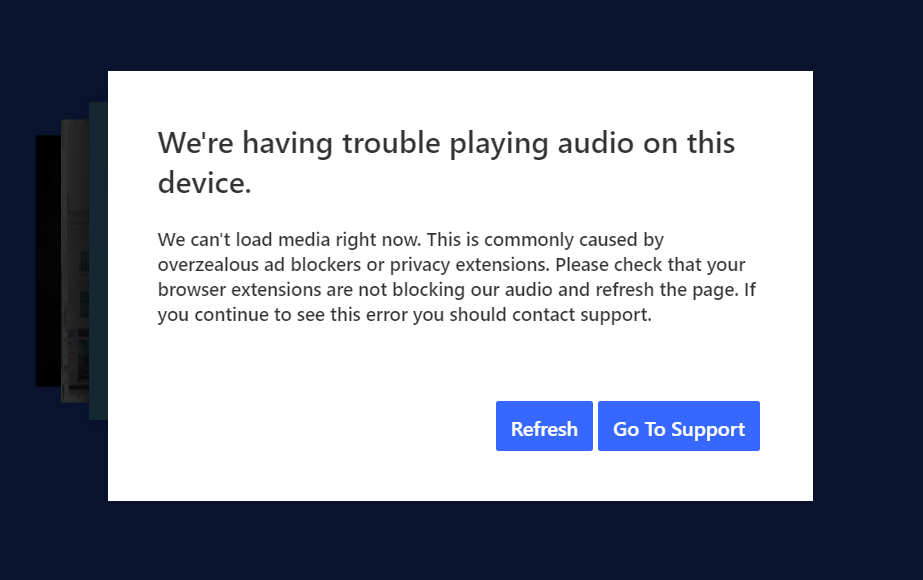
mod edit: updated title for clarity
141 Replies

- Mark as New
- Bookmark
- Subscribe
- Mute
- Subscribe to RSS Feed
- Permalink
- Report Inappropriate Content
I've been having this issue as well. Using both the desktop app and the website it will sometimes play for an hour or so before occurring and other times won't get through the third song. My computer is running windows 10 with an AMD CPU, MSI motherboard, NVIDIA GPU, no hardware issues present with any other software, connection is very stable with everything else. recently tried turning off windows defender since that is the only security I run that might affect the desktop app at all, and it did not work. It seems I am having more issues with Stations than I am with playlists, it hasn't happened at all with downloaded playlists, though I have had the issue occur with every station I have tried. After refreshing it always resumes playback but the issue will usually occur again another few songs later, always after loading the next song but before actually playing it.
I often run the app in the background with a videogame in the foreground, but I've had the issue occur while in the foreground as well. will edit reply with more details if anything occurs.

- Mark as New
- Bookmark
- Subscribe
- Mute
- Subscribe to RSS Feed
- Permalink
- Report Inappropriate Content
I have been having the same issue and it started at the end of August. I made no change to anything on my side. I have contacted support, walked through all of the steps they have given (clear cache, clear data, ensure no ad blockers, adjust your chrome settings, try different browers, try different networks, reboot your computer, reboot your network), and nothing fixes the issue. It seems to be worst during the middle of the day.
The last update I got from support was "I've passed this along to the appropriate parties for further investigation."
Is there any update?

- Mark as New
- Bookmark
- Subscribe
- Mute
- Subscribe to RSS Feed
- Permalink
- Report Inappropriate Content
It doesn't fix the problem, but if you escape out of the popup and hit the replay button on the bottom, it usually plays the next song without having to constantly refresh the screen. The music still stops about the same as usual, however I've had to refresh the screen several times when it's really bad, but hitting escape and replay usually works the first time.


- Mark as New
- Bookmark
- Subscribe
- Mute
- Subscribe to RSS Feed
- Permalink
- Report Inappropriate Content
Please Note: This message has been Accepted as a Solution to flag the current status or steps. This thread will be updated with more information as it is provided to the community moderation team. Thank you for your patience!
Pandora Update 9/25/2025:
Thanks to everyone who has shared their experience with this issue. We know how frustrating it can be when you’re just trying to enjoy Pandora and things don’t work the way they should.
Please know that your comments and posts are actively shared with our engineering teams for further investigation. While we don’t have an exact timeline to share, your reports are helping us better understand the scope of the issue and remain an important part of the process.
If you’re new to this thread, please be sure to provide the following details to help us:
Playback Experience:
- What were you listening to when playback stopped (Station, Album, Playlist, or Podcast)?
- Were you listening through the Pandora website or the Pandora Desktop App?
- If the website, which browser were you using (Chrome, Firefox, Edge)?
- Were you able to resume playback afterward?
Device Information:
- What is the make and model of your computer?
- What operating system are you running (e.g. Windows 10, Windows 11)?
As always, the Community Team will continue to update this thread as we receive information from our internal teams. We truly appreciate everyone’s patience and support as we continue working on this.
Pandora Update 8/21/2025:
Thanks for reporting your experience. To better understand what’s happening when playback stops on your computer, please share the following details so we can pass them along to our engineering team for further investigation:
Playback Experience
- What were you listening to when playback stopped (Station, Album, Playlist, or Podcast)?
- Were you listening through the Pandora website or the Pandora Desktop App?
- If the website, which browser (Chrome, Firefox, Edge)?
- Were you able to resume playback afterward?
Device information
- What is the make and model of your computer?
- What operating system are you running?
- If Windows, which version (e.g., Windows 10, Windows 11)?
Thank you for helping us with this information, it’s incredibly valuable as we continue our investigation.

- Mark as New
- Bookmark
- Subscribe
- Mute
- Subscribe to RSS Feed
- Permalink
- Report Inappropriate Content
I am also getting this error started about 3 weeks ago, and since it is across multiple browsers with multiple PC/MAC configurations.
This is not a windows/mac software or hardware issue; this is something Pandora Updated in their software 2-3 weeks ago. I never had an issue in the last 10+ years like this.
So please go back to you engineers and find out what was tweaked and update and remove it please.
This is definitely a Pandora issue not an everyone else issue.
- Mark as New
- Bookmark
- Subscribe
- Mute
- Subscribe to RSS Feed
- Permalink
- Report Inappropriate Content
@TannerPandora wrote:Please Note: This message has been Accepted as a Solution to flag the current status or steps. This thread will be updated with more information as it is provided to the community moderation team. Thank you for your patience!
Pandora Update 9/25/2025:
Thanks to everyone who has shared their experience with this issue. We know how frustrating it can be when you’re just trying to enjoy Pandora and things don’t work the way they should.
Please know that your comments and posts are actively shared with our engineering teams for further investigation. While we don’t have an exact timeline to share, your reports are helping us better understand the scope of the issue and remain an important part of the process.
If you’re new to this thread, please be sure to provide the following details to help us:
Playback Experience:
- What were you listening to when playback stopped (Station, Album, Playlist, or Podcast)?
- Were you listening through the Pandora website or the Pandora Desktop App?
- If the website, which browser were you using (Chrome, Firefox, Edge)?
- Were you able to resume playback afterward?
Device Information:
- What is the make and model of your computer?
- What operating system are you running (e.g. Windows 10, Windows 11)?
As always, the Community Team will continue to update this thread as we receive information from our internal teams. We truly appreciate everyone’s patience and support as we continue working on this.
To be fair, this isn't really a 'solved' situation as many of us are still reporting the issue. From my own experience, when I am at work, I can't tell what song I was listening, mostly my personal station which bounces between various songs.
This happens on both the Pandora Website and on the Pandora Desktop App - Mainly at work, although it only started happening after switching to Windows 11 Pro from Windows 2019 Server, as far as being noticeable.
I would sometimes get the error several times in a row when I do refresh.
Device wise, it is a Dell Precision 3680 Workstation running Windows 11 Pro 23h2 at the moment.
I run a similar build at home and don't see it or not as often as I do at work.
While work has a Palo Alto running, it didn't block requests for Pandora nor not nearly as aggressively as you would cite Ad Blockers doing so.
- Mark as New
- Bookmark
- Subscribe
- Mute
- Subscribe to RSS Feed
- Permalink
- Report Inappropriate Content
How is this a solution? No fix actions were proposed.
Terrible.
- Mark as New
- Bookmark
- Subscribe
- Mute
- Subscribe to RSS Feed
- Permalink
- Report Inappropriate Content
Adding this:

This came after refreshing from the previous 'Refresh' to see if it goes away.
Again, same machine, same os, same browser.
- Mark as New
- Bookmark
- Subscribe
- Mute
- Subscribe to RSS Feed
- Permalink
- Report Inappropriate Content
Playback Experience:
- What were you listening to when playback stopped (Station, Album, Playlist, or Podcast)?
- Philanthrope Radio Station
- Flamingosis Radio Station
- Were you listening through the Pandora website or the Pandora Desktop App?
- Website
- If the website, which browser were you using (Chrome, Firefox, Edge)?
- Chrome
- Edge
- Were you able to resume playback afterward?
- Sometimes I refresh and it works, sometimes it doesn't. Then I will switch browsers and it sometimes works, and it sometimes doesn't.
Device Information:
- What is the make and model of your computer?
- Lenovo Thinkpad E14
- What operating system are you running (e.g. Windows 10, Windows 11)?
- Windows 11
- Mark as New
- Bookmark
- Subscribe
- Mute
- Subscribe to RSS Feed
- Permalink
- Report Inappropriate Content
Listening to play list
Windows 10 or 11 on several machines using web browser: Firefox, Chrome, Edge and Pandora App
Able tor resume by hitting refresh
No problem with my android device.

- Mark as New
- Bookmark
- Subscribe
- Mute
- Subscribe to RSS Feed
- Permalink
- Report Inappropriate Content
Still happening on Desktop app. Pressing play several times often gets it to work.

- Mark as New
- Bookmark
- Subscribe
- Mute
- Subscribe to RSS Feed
- Permalink
- Report Inappropriate Content
Playback Experience:
- What were you listening to when playback stopped (Station, Album, Playlist, or Podcast)?
- >>Music, Any number of band-based stations, the failures are consistent across all of them.
- Were you listening through the Pandora website or the Pandora Desktop App?
- >> Desktop App and a both my my browsers. mobile app seems perfectly fine
- If the website, which browser were you using (Chrome, Firefox, Edge)?
- >>I use chrome and edge, this failure happens inside of both
- Were you able to resume playback afterward?
- >>Only after hitting refesh but sometimes I even that doesnt work; and I need to force the app to close, then relaunch. I would say it plays 1-2 songs then fails again; very repeatable.
- >>Interestingly, if I press play on my keyboard, it will sometime play without the error window being closed. and the song data behind it will "Stick" unchanged.
Device Information:
- What is the make and model of your computer?
- >>Home Build: i7-13700K, 64GB ram, 3090Ti
- What operating system are you running (e.g. Windows 10, Windows 11)?
- >> Win 11 Pro
- Mark as New
- Bookmark
- Subscribe
- Mute
- Subscribe to RSS Feed
- Permalink
- Report Inappropriate Content
I'm using Windows 11, the Pandora website through Google Chrome, and playing a playlist. I keep getting this message and cannot play music. When I use the "refresh" option, it still spins and gives me the error message. It's super frustrating!!
- Mark as New
- Bookmark
- Subscribe
- Mute
- Subscribe to RSS Feed
- Permalink
- Report Inappropriate Content
I'm having this issue on my chrome browser at work when streaming music regardless of which station I select.
- Chrome is up to date
- There are no adblockers (shouldn't matter, paid sub.)
- I've reboot the computer, multiple times
- Reset permissions
- Allowed Auto-play
- Allowed Pop-ups
I cannot install the desktop app, requires IT admin to do it & they're not allowed. If I refresh the page enough times, it will stream music again for 1-3 songs before stopping with the error.
- Mark as New
- Bookmark
- Subscribe
- Mute
- Subscribe to RSS Feed
- Permalink
- Report Inappropriate Content
Pandora can fix this issue or I'm canceling after many years of paid subscriptions. It's ridiculous...I have enough things to work on besides my background music. This is worthless.
- Mark as New
- Bookmark
- Subscribe
- Mute
- Subscribe to RSS Feed
- Permalink
- Report Inappropriate Content
Are we any closer to a solution on this yet? The website has been constantly dropping out with this error for the last three months. Many of us are paying customers, and we're clearly not getting the service we paid for. This is a massive disruption to the service, with the music often cutting out every few songs. It's worse than listening to music with ads.
At this point, you should be giving us entire months of credit on our subscriptions until you get this fixed.
- Mark as New
- Bookmark
- Subscribe
- Mute
- Subscribe to RSS Feed
- Permalink
- Report Inappropriate Content
I went out on a limb and tried using the stock Windows Edge browser, same error message as chrome. There are no extensions or add blockers to adjust or remove. Does the browser player just not work on Windows 11?

- Mark as New
- Bookmark
- Subscribe
- Mute
- Subscribe to RSS Feed
- Permalink
- Report Inappropriate Content
Time to unsubscribe. 3 months and still no solution provided for this situation.
- Mark as New
- Bookmark
- Subscribe
- Mute
- Subscribe to RSS Feed
- Permalink
- Report Inappropriate Content
I am experiencing the message that others are asking about for about 4-6 weeks
Message reads as "We're having trouble playing audio on this device."
1) I am typically listening to a Station
2) I am usually going thru a Pandora Website
3) I am using the Chrome Browser
4)The playback option was a temporary fix, It will come back for one song or less
The trouble i am having is on my work computer, At my home Sonos is able to play Pandora.
Unfortunately i am at work more than at home.
I would like to be reimbursed for this last month since i was unable to use the software and it is obvious i am not the only one.
Irene Oldfather

- Mark as New
- Bookmark
- Subscribe
- Mute
- Subscribe to RSS Feed
- Permalink
- Report Inappropriate Content
I'm having the same issue...
- listening to a station via the Pandora website
- using Safari on my Mac desktop, operating system Sonoma 14.7.3
- not working whether I'm using a VPN or not
I have been listening for years and have never had this problem.
