Turn on suggestions
Auto-suggest helps you quickly narrow down your search results by suggesting possible matches as you type.
- Pandora Community
- :
- Support
- :
- iOS
- :
- Change account associated with app
Options
- Subscribe to RSS Feed
- Mark Post as New
- Mark Post as Read
- Float this Post for Current User
- Bookmark
- Subscribe
- Mute
- Printer Friendly Page

- Mark as New
- Bookmark
- Subscribe
- Mute
- Subscribe to RSS Feed
- Permalink
- Report Inappropriate Content
How do I change the account associated with an iPhone app? The only option is to delete the account and I don't want to delete the pandora account only change the pandora account being used to login with the app.
1 Solution
Accepted Solutions


- Mark as New
- Bookmark
- Subscribe
- Mute
- Subscribe to RSS Feed
- Permalink
- Report Inappropriate Content
Hey there, @JCINAZ. 👋
You won't need to delete the account.
You should be able to sign out of your Pandora account from your Settings.
Tap the Profile icon in the Pandora app, select the Settings gear in the top right corner and scroll down to tap the Sign Out button.
If that doesn't work for any reason, please write back to let me know.
If possible, please also provide a screenshot of the Settings screen for me.
Alyssa | Community Manager
Join the discussion in Community Chat
Your turn: Q: What genre grew on you over time?
Check out: Pandora for Creators Community
Share yours: Q: What's your sound color? ✨
3 Replies
- Mark as New
- Bookmark
- Subscribe
- Mute
- Subscribe to RSS Feed
- Permalink
- Report Inappropriate Content
Hey there, @JCINAZ. 👋
You won't need to delete the account.
You should be able to sign out of your Pandora account from your Settings.
Tap the Profile icon in the Pandora app, select the Settings gear in the top right corner and scroll down to tap the Sign Out button.
If that doesn't work for any reason, please write back to let me know.
If possible, please also provide a screenshot of the Settings screen for me.
Alyssa | Community Manager
Join the discussion in Community Chat
Your turn: Q: What genre grew on you over time?
Check out: Pandora for Creators Community
Share yours: Q: What's your sound color? ✨

- Mark as New
- Bookmark
- Subscribe
- Mute
- Subscribe to RSS Feed
- Permalink
- Report Inappropriate Content
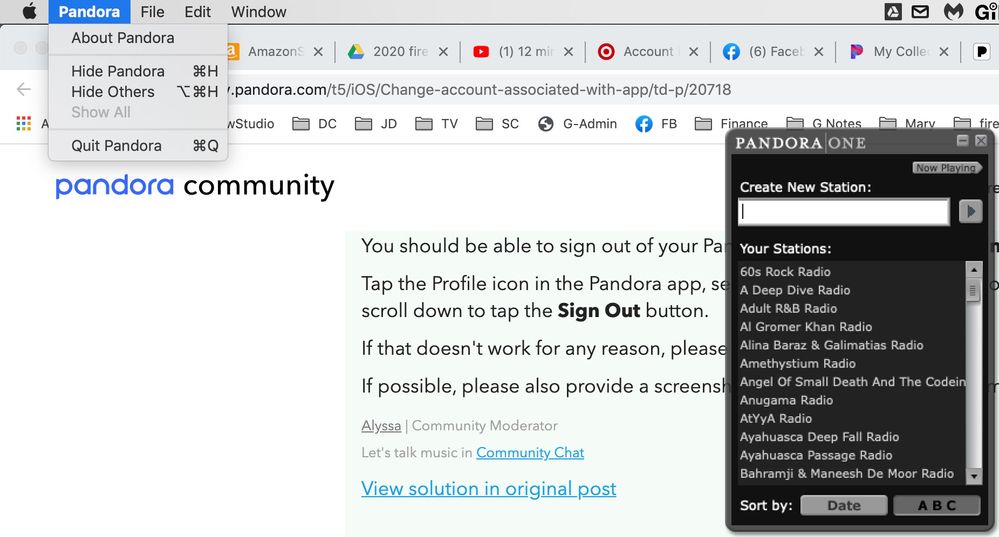
My Mac desktop app seems to be signed in under another account, or at least I do not have my usual playlist. And I can not find a way to log out and resign in nor do I see the profile icon or settings gear referred to above. Here is a screengrab of what I see.
Thank you for your help...

- Mark as New
- Bookmark
- Subscribe
- Mute
- Subscribe to RSS Feed
- Permalink
- Report Inappropriate Content
Hi @johnd619! Thanks for posting.
Based on your screenshot it looks like you're using the older Pandora One Desktop app that we actually don't support any longer.
I did check your account and I do see the Pandora One desktop app associated with this Pandora account.
Is there a particular station(s) you're looking for?
++
You can install the updated Pandora desktop app for Mac computers here.
Open the downloaded file and follow the prompts to complete the installation.
Keep in mind the Pandora app works the same as our website. All of the features on our website will be available and any changes you make will sync across all of your devices.
Let me know how it goes.
*Minimum System Requirements: Mac OS 10.10 Yosemite or later.
