Turn on suggestions
Auto-suggest helps you quickly narrow down your search results by suggesting possible matches as you type.
- Pandora Community
- :
- Support
- :
- Desktop
- :
- Chrome: Thumbs Up / Down Option Missing
Options
- Subscribe to RSS Feed
- Mark Post as New
- Mark Post as Read
- Float this Post for Current User
- Bookmark
- Subscribe
- Mute
- Printer Friendly Page

- Mark as New
- Bookmark
- Subscribe
- Mute
- Subscribe to RSS Feed
- Permalink
- Report Inappropriate Content
I am a longtime Pandora user and all of a sudden today on my PC the thumbs up/thumbs down option at the bottom each track that plays is missing (see image). This has never happened before but is still there on my Pandora iphone app. So, wondering what must I do to get this back?
1 Solution
Accepted Solutions


- Mark as New
- Bookmark
- Subscribe
- Mute
- Subscribe to RSS Feed
- Permalink
- Report Inappropriate Content
Hey, @nancyreyner. 👋
Thanks for letting us know about your experience. Sorry to hear that your Thumb features are missing during your listening sessions. I do have a few things you can try in order to resolve this issue.
Web Troubleshooting:
You can use the following steps for the browser you use most when listening to Pandora.
++
Network Troubleshooting:
You can also try rebooting your connection:
- Shut down your device completely;
- Unplug your modem and router, wait one full minute, and then plug them back in;
- Wait five more minutes to allow the modem and router to fully boot back up;
- Turn your device back on and try Pandora again.
I hope this helps. Let me know how it goes. 🎧
Alyssa | Community Manager
Join the discussion in Community Chat
Your turn: Q: What genre grew on you over time?
Check out: Pandora for Creators Community
Share yours: Q: What's your sound color? ✨
18 Replies

- Mark as New
- Bookmark
- Subscribe
- Mute
- Subscribe to RSS Feed
- Permalink
- Report Inappropriate Content
@pac67 Could you tell me a bit more about what is happening?
- If you are on a computer, are you listening from:
- A Mac or Windows computer?
- Our website, or the desktop app? If you're listening from our website, what browser are you using?
Thanks for working with me on this. 🤝
Adam | Community Moderator
New to the Community? Introduce yourself here
New music alert! Picks of the Week (5.26.26)
- Mark as New
- Bookmark
- Subscribe
- Mute
- Subscribe to RSS Feed
- Permalink
- Report Inappropriate Content
WIndows computer. Yes the pandora.com website. Using Chrome. Again, nothing has changed in my routine for months and months. Been doing the same routine here and all of a sudden the thumbs up and thumbs down option below the song are gone.
- Mark as New
- Bookmark
- Subscribe
- Mute
- Subscribe to RSS Feed
- Permalink
- Report Inappropriate Content
@pac67 Thanks for following up with that information.
Since it sounds like this is only an issue on your computer, I moved your post over to the Desktop space.
I recommend running through the following troubleshooting steps: Chrome Troubleshooting
As you continue to listen to your stations after running through those steps, check to confirm if the thumb options start to appear again on the new tracks that play.
Thanks for working with me on this. 🤝
Adam | Community Moderator
New to the Community? Introduce yourself here
New music alert! Picks of the Week (5.26.26)
- Mark as New
- Bookmark
- Subscribe
- Mute
- Subscribe to RSS Feed
- Permalink
- Report Inappropriate Content
I have the same exact problem. Started 3 days ago. Also, I have NO volume controls. Five minutes after writing this, I decided to restart my computer, and the problem is solved.
- Mark as New
- Bookmark
- Subscribe
- Mute
- Subscribe to RSS Feed
- Permalink
- Report Inappropriate Content
Thanks for the update, @mua. Sounds like restarting your computer helped resolve the issue.
@pac67 Could you try restarting your computer? You could also try logging out and then logging back in to see if that helps.
Let us know how it goes. 🎧
Alyssa | Community Manager
Join the discussion in Community Chat
Your turn: Q: What genre grew on you over time?
Check out: Pandora for Creators Community
Share yours: Q: What's your sound color? ✨
- Mark as New
- Bookmark
- Subscribe
- Mute
- Subscribe to RSS Feed
- Permalink
- Report Inappropriate Content
Yep, all was in good shape this morning. Thanks!
- Mark as New
- Bookmark
- Subscribe
- Mute
- Subscribe to RSS Feed
- Permalink
- Report Inappropriate Content
Glad to hear it, @pac67. Let us know if anything else pops up.
Happy listening! 🎧
Alyssa | Community Manager
Join the discussion in Community Chat
Your turn: Q: What genre grew on you over time?
Check out: Pandora for Creators Community
Share yours: Q: What's your sound color? ✨

- Mark as New
- Bookmark
- Subscribe
- Mute
- Subscribe to RSS Feed
- Permalink
- Report Inappropriate Content
Adam I have the same issue. I'm listening to Pandora from the internet website. I don't have thumbs up or down options anymore but had them for years. I tried logging out and back in on both Chrome and also Edge. I tried from my Windows 10 pc and also from my Mac. There is no thumbs up anymore on "now Playing" section. Please help. I've tried everything.
- Mark as New
- Bookmark
- Subscribe
- Mute
- Subscribe to RSS Feed
- Permalink
- Report Inappropriate Content
Hey, @nancyreyner. 👋
Thanks for letting us know about your experience. Sorry to hear that your Thumb features are missing during your listening sessions. I do have a few things you can try in order to resolve this issue.
Web Troubleshooting:
You can use the following steps for the browser you use most when listening to Pandora.
++
Network Troubleshooting:
You can also try rebooting your connection:
- Shut down your device completely;
- Unplug your modem and router, wait one full minute, and then plug them back in;
- Wait five more minutes to allow the modem and router to fully boot back up;
- Turn your device back on and try Pandora again.
I hope this helps. Let me know how it goes. 🎧
Alyssa | Community Manager
Join the discussion in Community Chat
Your turn: Q: What genre grew on you over time?
Check out: Pandora for Creators Community
Share yours: Q: What's your sound color? ✨
- Mark as New
- Bookmark
- Subscribe
- Mute
- Subscribe to RSS Feed
- Permalink
- Report Inappropriate Content
Thank you! For some reason the thumbs up and down options appeared today without having to do anything. Odd but glad it got resolved.
- Mark as New
- Bookmark
- Subscribe
- Mute
- Subscribe to RSS Feed
- Permalink
- Report Inappropriate Content
Awesome - so glad to hear that, @nancyreyner.
If anything else pops up, please don't hesitate to let us know. Happy listening! 🎧
Alyssa | Community Manager
Join the discussion in Community Chat
Your turn: Q: What genre grew on you over time?
Check out: Pandora for Creators Community
Share yours: Q: What's your sound color? ✨

- Mark as New
- Bookmark
- Subscribe
- Mute
- Subscribe to RSS Feed
- Permalink
- Report Inappropriate Content
They're missing for me on the Pandora website again.
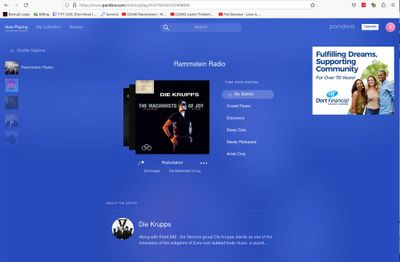
The desktop website doesn't have thumbs up or down anymore and the interface has drastically changed. The thumbs up and down is still on the Android app.
Mod edit: merge posts
- Mark as New
- Bookmark
- Subscribe
- Mute
- Subscribe to RSS Feed
- Permalink
- Report Inappropriate Content
Oh, you have to pick on the album cover and then you can do a thumbs up or down on the current song and previous songs. This is so non-intuitive,


- Mark as New
- Bookmark
- Subscribe
- Mute
- Subscribe to RSS Feed
- Permalink
- Report Inappropriate Content
Hi @blazingraptor 👋
You can find the thumbs up/down button, on our website, in the "now playing" panel in the bottom of the screen to the station that you're playing. (see image below)
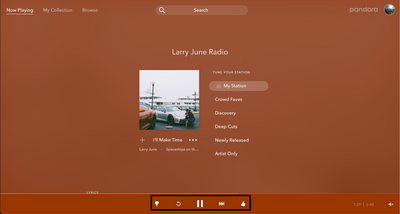
If you're not seeing that now playing panel on your end, let's try some troubleshooting steps for your web browser. Please complete the Chrome Troubleshooting steps to help that panel to reappear.
However if you're not using the Chrome browser, please select the following troubleshooting steps for the browser you're using below:
Hope this helps, let me know if this works!
- Mark as New
- Bookmark
- Subscribe
- Mute
- Subscribe to RSS Feed
- Permalink
- Report Inappropriate Content
This started happening to me both on a Mac
running Chrome and on the app on my iPhone. I have tried all of the suggestions, but nothing is working. This is the best part of Pandora as it allows the algorithm to work properly. Without it, I might as well stick with Spotify

- Mark as New
- Bookmark
- Subscribe
- Mute
- Subscribe to RSS Feed
- Permalink
- Report Inappropriate Content
Hi @mmcc , thanks for posting.
Are you still experiencing this? If you are can you tell me a bit more about this?
Are both devices connected to the same internet network when this happens?
Do you experience it on any other device?
- Mark as New
- Bookmark
- Subscribe
- Mute
- Subscribe to RSS Feed
- Permalink
- Report Inappropriate Content
Hi, yes, it happens on laptop using chrome and logging in from chrome. It
also happens when using sonos on iphone and on laptop.
also happens when using sonos on iphone and on laptop.
- Mark as New
- Bookmark
- Subscribe
- Mute
- Subscribe to RSS Feed
- Permalink
- Report Inappropriate Content
Thanks for explaining @mmcc.
It sounds like the issue may be related to the network you're using to connect to Pandora.
Please try connecting your devices directly via an Ethernet cable and see if that helps.
If there is no change, try rebooting your connection:
- Shut down your device completely;
- Unplug your modem and router, wait one full minute, and then plug them back in;
- Wait five more minutes to allow the modem and router to fully boot back up;
- Turn your device back on and try Pandora again.
If Pandora still isn't working, could you check if you're able to connect to your network using another streaming service, such as YouTube?
You might also try connecting your device to an entirely different network, or using a different device on your current network, to see if your streaming improves.
Let me know how it goes!
