Turn on suggestions
Auto-suggest helps you quickly narrow down your search results by suggesting possible matches as you type.
- Pandora Community
- :
- Support
- :
- Desktop
- :
- Re: Desktop App: 'We can't load media right now' m...
Options
- Subscribe to RSS Feed
- Mark Post as New
- Mark Post as Read
- Float this Post for Current User
- Bookmark
- Subscribe
- Mute
- Printer Friendly Page

07-14-2025
06:56 AM
- Mark as New
- Bookmark
- Subscribe
- Mute
- Subscribe to RSS Feed
- Permalink
- Report Inappropriate Content
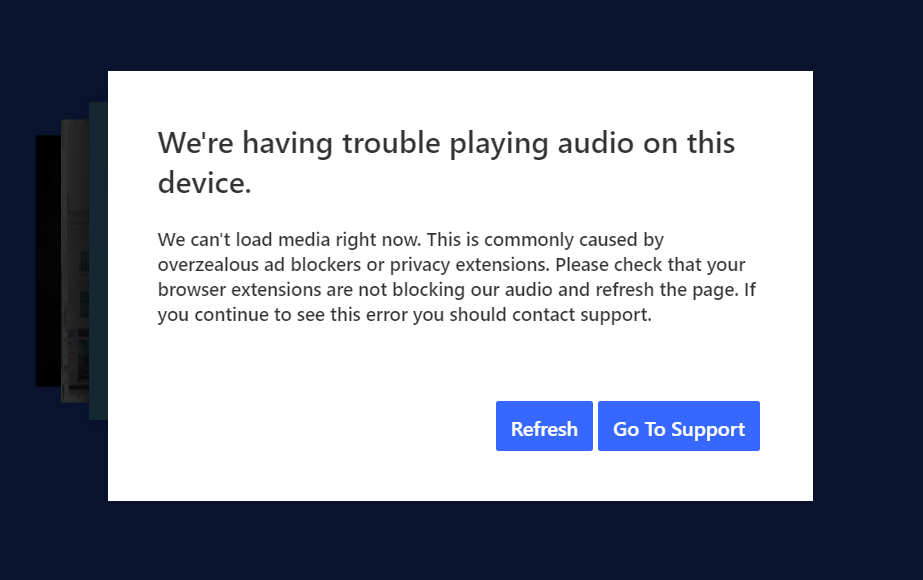
Recently (around July 10th) Pandora music started shutting down unexpectedly and displaying the message that read "We'er having trouble playing audio on this device." This was after years of uninterrupted and satisfactory service.
Trying various troubleshooting suggestions provided by Pandora Support has not fixed the issue.
Has anyone else experienced this problem?
mod edit: updated title for clarity
141 Replies


- Mark as New
- Bookmark
- Subscribe
- Mute
- Subscribe to RSS Feed
- Permalink
- Report Inappropriate Content
Hi @hippo123 , thanks for posting and sorry for the trouble.
I moved your post to this thread as your issue seems to have started on Pandora on your browser. If you haven't yet, please check and try the troubleshooting steps for Chrome described here.
You can also try these troubleshooting steps for the desktop app:
Let me know how it goes.

- Mark as New
- Bookmark
- Subscribe
- Mute
- Subscribe to RSS Feed
- Permalink
- Report Inappropriate Content
I have been having the same issue on my Mac Pro using any browser or the app itself for the past 10 days. I tried all troubleshooting steps with no luck.
- Mark as New
- Bookmark
- Subscribe
- Mute
- Subscribe to RSS Feed
- Permalink
- Report Inappropriate Content
If you refer to the post above. you will see the error messages and all the info. I have done everything in the firefox troubleshooting thing and countless other things
These are separate issues. Desktop app is not working. Firefox is not working.
- Mark as New
- Bookmark
- Subscribe
- Mute
- Subscribe to RSS Feed
- Permalink
- Report Inappropriate Content
I am still getting the"We're having trouble playing audio on this device" error on both the Desktop Mac App and the Chrome browser app. The music just stops playing after a while and gives me the error, forcing me to Refresh (which, by the way, is wonky and does not always work. I usually have to switch my station to get it to play, then switch back to the station I was listening to. Then it plays another song stretch again, before serving the error again. Needless to say, it's disruptive.) Again, this is a recent development - I am a Plus subscriber and longtime Pandora user and it's never happened to me in my many years of using the service.
Curiously, if I hit the "Go To Support" button on the error message in both the Chrome Browser and Desktop App, it tells me the Pandora help page is Not Secure, and that the Certificate is Invalid. I mention it in case it helps identify an underlying problem with permissions.
Thank you for your help.


- Mark as New
- Bookmark
- Subscribe
- Mute
- Subscribe to RSS Feed
- Permalink
- Report Inappropriate Content
Pandora still needs to fix this, but I've had slightly better luck on Firefox - have only got the "We're having trouble playing audio on this device." once in two days...
Not sure if this helped - but I followed these instructions as well - and I reject cookies...
To do that:
- Click the menu icon and select Preferences.
- From the Privacy & Security tab, scroll down to the Permissions section.
- Find Autoplay and select Settings... to view your default option.
If your default is set to Block Audio or Block Audio or Video, you'll need to make an exception for the Pandora website.
- Return to pandora.com
- Select the padlock icon in the address bar to open the Site Information drop-down panel.
- Click on the arrow to the right of Connection Secure to show connection details and select More Information.
- Click Permissions and locate Autoplay.
- Uncheck the Use Default box and select Allow Audio and Video.

- Mark as New
- Bookmark
- Subscribe
- Mute
- Subscribe to RSS Feed
- Permalink
- Report Inappropriate Content
Did not fix the issue.
Yes, same issue. Work PC. Windows. Started around 2 to 3 weeks ago. Tried fixing it myself and still is not working. Haven't had this issue in about 5 years on same network at work.

- Mark as New
- Bookmark
- Subscribe
- Mute
- Subscribe to RSS Feed
- Permalink
- Report Inappropriate Content
@LeonPandora , any word on this from the devs? It's clear this is an issue with Pandora and not with individual computers.

- Mark as New
- Bookmark
- Subscribe
- Mute
- Subscribe to RSS Feed
- Permalink
- Report Inappropriate Content
I too am at work, can only restart the Mac computer so many times...I've used multiple web browsers and I get the same pop up. I also pay for this service...this only started happening in the last week or so. I don't get this problem with the apps either on my iPad or iPhone...

- Mark as New
- Bookmark
- Subscribe
- Mute
- Subscribe to RSS Feed
- Permalink
- Report Inappropriate Content
I have been experiencing this for the past few weeks as well. I too have an upgraded account without ad blockers on Chrome. The only thing that temporarily prevents constant interruptions is clearing the browser cache, but it always comes back like an hour later. There is clearly a caching issue with Pandora.

- Mark as New
- Bookmark
- Subscribe
- Mute
- Subscribe to RSS Feed
- Permalink
- Report Inappropriate Content
Ad Blocker False-Positive after Restart
This happens to me several times a day. It does not matter what I do. Pandora should fix this. I'm sure other people have this problem.
- Mark as New
- Bookmark
- Subscribe
- Mute
- Subscribe to RSS Feed
- Permalink
- Report Inappropriate Content
Why is nothing being done about this?
- Mark as New
- Bookmark
- Subscribe
- Mute
- Subscribe to RSS Feed
- Permalink
- Report Inappropriate Content
I’ve been with Pandora for almost 20 years, this is starting to feel like the early signs of a break up. Is it Sirius that is complicating things between us? Every relationship has its challenges, but communication is key…
- Mark as New
- Bookmark
- Subscribe
- Mute
- Subscribe to RSS Feed
- Permalink
- Report Inappropriate Content
I was experiencing this error a lot on my browser, I have an instance of Firefox without any extensions so I can listen to Pandora on it. Then after some searching I found out about the Desktop app.. so I download the desktop app.
I'm still getting the overzealous adblock error on the desktop app. My computer zero adblocking software on it. Did sometime in the last 9 years has Pandora required a minimum internet speed?
What I've done to ZERO EFFECT:
Reset App Data
Uninstall / Reinstall the Desktop App
Restarted System
Restarted Modem
Restarted Router
Flushed my DNS
Reconfigured my DNS and IP Settings
And I am STILL getting this error, I even bought a free trial of Pandora Premium to see if that fixed it, and it didn't.
What the heck.
- Mark as New
- Bookmark
- Subscribe
- Mute
- Subscribe to RSS Feed
- Permalink
- Report Inappropriate Content
Why isn't Pandora addressing this issue? If it continues much longer it will lose subscribers like me, and I have had a subscription for over 10 years.
- Mark as New
- Bookmark
- Subscribe
- Mute
- Subscribe to RSS Feed
- Permalink
- Report Inappropriate Content
Hi @ericrparton ,
Can you tell me a bit more about what is happening? Is this particular issue happening on a computer, on another device, or across all platforms?
When it happens on your computer:
- Are you listening from:
- A Mac or Windows computer?
- Our website, or the desktop app? If you're listening from our website, what browser are you using?
- Is there an error message?
- If yes, what exactly does it say?
- If not, tell me exactly what you see when you go to https://www.pandora.com
Let me know.
- Mark as New
- Bookmark
- Subscribe
- Mute
- Subscribe to RSS Feed
- Permalink
- Report Inappropriate Content
I'm going to keep bumping this until Pandora staff respond. We just want some communication. This is getting absurd.
- Mark as New
- Bookmark
- Subscribe
- Mute
- Subscribe to RSS Feed
- Permalink
- Report Inappropriate Content
Why is nothing being done about this?
- Mark as New
- Bookmark
- Subscribe
- Mute
- Subscribe to RSS Feed
- Permalink
- Report Inappropriate Content
Agreed. Mine is still broken too, a month later. Would definitely appreciate so follow up.
- Mark as New
- Bookmark
- Subscribe
- Mute
- Subscribe to RSS Feed
- Permalink
- Report Inappropriate Content
Issue is still occurring. Bumping.

- Mark as New
- Bookmark
- Subscribe
- Mute
- Subscribe to RSS Feed
- Permalink
- Report Inappropriate Content
Please Note: This message has been Accepted as a Solution to flag the current status or steps. This thread will be updated with more information as it is provided to the community moderation team. Thank you for your patience!
Pandora Update 8/21/2025:
Thanks for reporting your experience. To better understand what’s happening when playback stops on your computer, please share the following details so we can pass them along to our engineering team for further investigation:
Playback experience
-
What were you listening to when playback stopped (Station, Album, Playlist, or Podcast)?
-
Were you listening through the Pandora website or the Pandora Desktop App?
-
If the website, which browser (Chrome, Firefox, Edge)?
-
-
Were you able to resume playback afterward?
Device information
-
What is the make and model of your computer?
-
What operating system are you running?
-
If Windows, which version (e.g., Windows 10, Windows 11)?
-
Thank you for helping us with this information, it’s incredibly valuable as we continue our investigation.
Adam | Community Moderator
New to the Community? Introduce yourself here
New music alert! Picks of the Week (12.2.25)
