Turn on suggestions
Auto-suggest helps you quickly narrow down your search results by suggesting possible matches as you type.
- Pandora Community
- :
- Support
- :
- iOS
- :
- Re: Podcasts play when the app is opened
Options
- Subscribe to RSS Feed
- Mark Post as New
- Mark Post as Read
- Float this Post for Current User
- Bookmark
- Subscribe
- Mute
- Printer Friendly Page

- Mark as New
- Bookmark
- Subscribe
- Mute
- Subscribe to RSS Feed
- Permalink
- Report Inappropriate Content
As if by design, after I accidentally click on a podcast once, the app decides that I should continue listening to it whenever the app is open and no music is playing. I don’t personally like podcasts and its just an annoyance to hear because of one miss click. Ive deleted and remade my account twice now and its getting tiring. I just wanted to know if theres a way to turn off podcasts in general.
1 Solution
Accepted Solutions


- Mark as New
- Bookmark
- Subscribe
- Mute
- Subscribe to RSS Feed
- Permalink
- Report Inappropriate Content
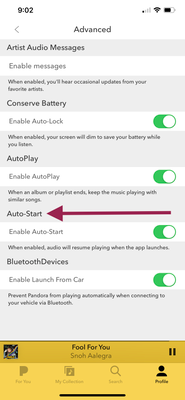
@Bean05 It would look like this under your Advanced tab.
Could you send over a screenshot of what you're seeing?
Can you please send me a screenshot of exactly what you're seeing?
To take a screenshot on an iPhone 8 (or earlier) or an iPad or iPod touch:
- Press and hold the lock button (the button on the top right side) and the home button (the circular button on the bottom of your device) at the same time.
To take a screenshot on an iPhone X:
- Press and hold the lock button (the button on the right side) and the volume up button (on the left side) at the same time.
- In iOS 12, a thumbnail of your screenshot appears in the lower-left corner of your device. Tap the thumbnail to add drawings and text with Markup, or swipe left on the thumbnail to dismiss it.
To find the screenshot you just took, go to Photos > Albums and tap Screenshots. Send this photo as an attachment to your response.
++
Also, what version of the Pandora app are you using? Currently Pandora app version 2011.1 is available to iOS listeners.
- Pandora version: (Pandora > Profile tab > Settings gear & scroll to the bottom of the screen)
Thanks for sticking with me on this. 🎧
Alyssa | Community Manager
Join the discussion in Community Chat
Your turn: This or That: November 2026
Check out: Pandora for Creators Community
5 Replies
- Mark as New
- Bookmark
- Subscribe
- Mute
- Subscribe to RSS Feed
- Permalink
- Report Inappropriate Content
Hi, there @Bean05. 👋
Nice to see you around the community space.
Unfortunately, there isn't a way to disable podcasts altogether on your account. If you'd like to see a feature where you can disable all podcasts, feel free to create a request here.
However, if you perform the following, this should help with anything playing as soon as you launch the app.
- Go to your Profile
- Click on the ⚙️(gear icon)
- Tap on "Advanced"
- Toggle "Enable Auto-Start" to off.
Hope this helps! 🎧
Alyssa | Community Manager
Join the discussion in Community Chat
Your turn: This or That: November 2026
Check out: Pandora for Creators Community
- Mark as New
- Bookmark
- Subscribe
- Mute
- Subscribe to RSS Feed
- Permalink
- Report Inappropriate Content
I’m not sure why but I don’t have the enable auto start option under advanced. If you have another way I would greatly appreciate it.
- Mark as New
- Bookmark
- Subscribe
- Mute
- Subscribe to RSS Feed
- Permalink
- Report Inappropriate Content
@Bean05 It would look like this under your Advanced tab.
Could you send over a screenshot of what you're seeing?
Can you please send me a screenshot of exactly what you're seeing?
To take a screenshot on an iPhone 8 (or earlier) or an iPad or iPod touch:
- Press and hold the lock button (the button on the top right side) and the home button (the circular button on the bottom of your device) at the same time.
To take a screenshot on an iPhone X:
- Press and hold the lock button (the button on the right side) and the volume up button (on the left side) at the same time.
- In iOS 12, a thumbnail of your screenshot appears in the lower-left corner of your device. Tap the thumbnail to add drawings and text with Markup, or swipe left on the thumbnail to dismiss it.
To find the screenshot you just took, go to Photos > Albums and tap Screenshots. Send this photo as an attachment to your response.
++
Also, what version of the Pandora app are you using? Currently Pandora app version 2011.1 is available to iOS listeners.
- Pandora version: (Pandora > Profile tab > Settings gear & scroll to the bottom of the screen)
Thanks for sticking with me on this. 🎧
Alyssa | Community Manager
Join the discussion in Community Chat
Your turn: This or That: November 2026
Check out: Pandora for Creators Community
- Mark as New
- Bookmark
- Subscribe
- Mute
- Subscribe to RSS Feed
- Permalink
- Report Inappropriate Content
Thank you so much! I’m not sure why I didn’t see it before but the reference helped.

- Mark as New
- Bookmark
- Subscribe
- Mute
- Subscribe to RSS Feed
- Permalink
- Report Inappropriate Content
We're always happy to help.
Hope we continue to see you around the Community! 😁
Adam | Community Moderator
New to the Community? Introduce yourself here
New music alert! Picks of the Week (5.26.26)
